

Few things worry publishers more than a sudden change in Discover traffic. Google’s page on Discover (last updated 9 March 2026, as we read it) is direct about this: traffic from Discover is less predictable and dependable than keyword-driven search visits. It says to treat Discover as supplemental to search. This guide turns that page into a diagnosis routine. The table and log are our own framework; the reasons come from Google.
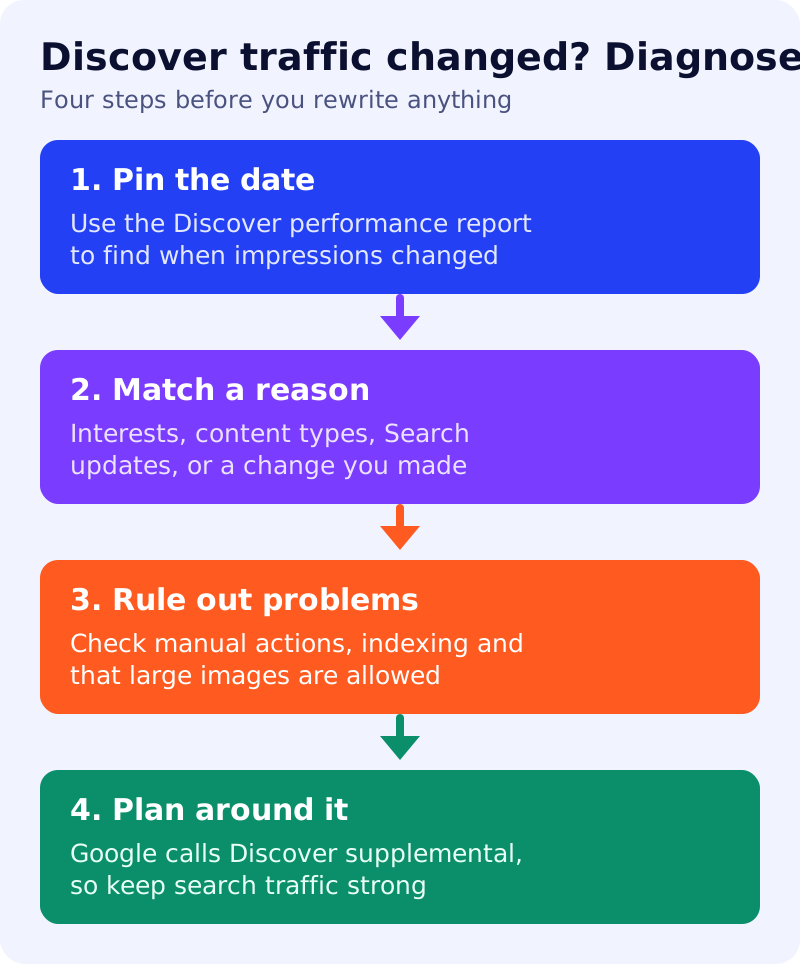
What Google says changes Discover traffic
Google lists these reasons for fluctuation:
- Changing interests. Discover aims to show content matching what someone is interested in, partly based on search activity. If interest in a topic fades, their feed may show other content.
- Content types. Discover adjusts the types of content it shows, and regularly shows topics including sports, health, entertainment and lifestyle.
- Updates to Search. Because Discover extends Search, updates can sometimes change traffic. Google points to its core updates documentation.
It also says that changes in traffic may be unrelated to the quality or publishing frequency of your content.
Step 1: pin the date
Open the Discover performance report in Search Console. Google says it shows impressions, clicks and click-through rate for content that appeared in the last 16 months, once a minimum impressions threshold is met, and that it includes Chrome traffic. Find the first day impressions changed.
Step 2: match a reason
This is our own decision table. Treat it as a hypothesis list, not a verdict.
| What you see | Likely reason to test first |
|---|---|
| One topic falls, others hold | Changing interests |
| A format you rely on falls across the site | Content types |
| A sitewide change near a known Search update | Updates to Search |
| A change soon after you edited templates, images or headlines | Your own change |
| A spike that fades within days | Normal Discover behaviour, per Google’s description of its serendipitous nature |
Step 3: rule out problems
Google says Discover manual actions appear in Search Console under Security and manual actions. Check that. Confirm pages are indexed and not blocked. Check images: Google recommends at least 1200 px wide images, enabled by the max-image-preview:large setting, and says to avoid generic images such as logos in og:image. Our Discover checklist covers this in ten minutes.
Step 4: plan around it
Keep a record, then reduce dependence. Our view: if more than a modest share of your traffic comes from Discover, build search, email and direct traffic so a swing does not hurt.
A log template
Record each week: date, Discover impressions and clicks, any Search update, any change you made, and your best guess at the reason. After three months, patterns are easier to see than in any single week.
What to do
- Pin the date of your last big change in the Discover report.
- Match it to a reason using the table, and test one cause at a time.
- Check manual actions, indexing and images.
- Review headlines without clickbait, which Google says to avoid.
- Read how Google removes stale stories and the recent source-tap bug.