
A headline decides whether a person taps your story in Discover. Google’s Discover documentation, last updated in March 2026, is clear about what it does not want, and it gives site owners a simple standard. This guide turns that standard into before and after rewrites. The example headlines are our own illustrations, written to show the pattern.
What Google says to avoid
Google recommends avoiding clickbait and similar tactics that artificially inflate engagement. It describes these as using misleading or exaggerated details in preview content (title, snippets or images) to increase appeal, or withholding crucial information needed to understand what the content is about. It also advises avoiding sensationalism that manipulates appeal by catering to morbid curiosity, titillation or outrage. The positive standard is a page title or headline that captures the essence of the content, with content that is timely, tells a story well or provides unique insights.
The documentation also notes that Discover manual actions may appear in Search Console under Security and Manual actions if a site violates Discover content policies.
Four rewrites
-
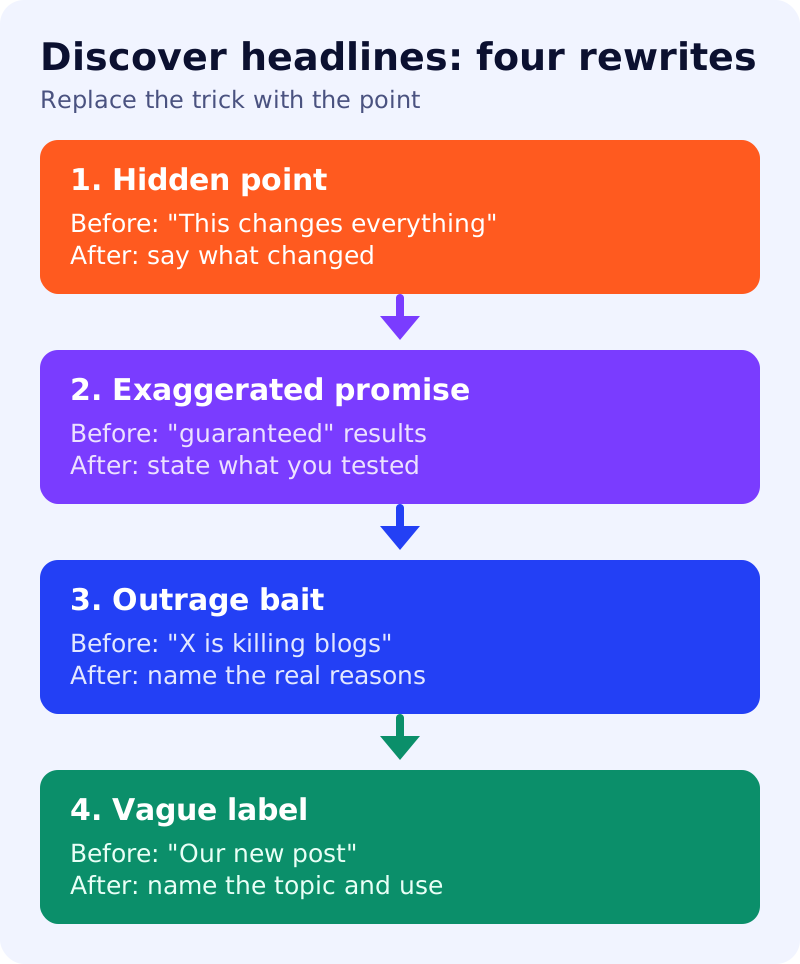
Hidden point. Before: “This Google update changes everything.” After: “Google updated its guidance on user-generated spam: what to check on your pages.” The first version withholds what changed. The second says it.
-
Exaggerated promise. Before: “The guaranteed trick to get cited by AI answers.” After: “Five checks that make a page easier for AI search to use.” Nobody outside the search engines can guarantee a citation, so the promise itself is misleading.
-
Outrage bait. Before: “Google is killing small blogs.” After: “Why some blogs see Discover traffic fall: three reasons Google lists.” The second headline matches content that Google itself describes: changing interests, content types and Search updates.
-
Vague label. Before: “Our new post.” After: “A 10-minute Discover test for blog posts.” A reader should know the topic and the use before tapping.
A quick test for any headline
Read the headline, then read the first paragraph. If the paragraph does not deliver what the headline promised, the headline is misleading. If the headline could belong to any article on your site, it is too vague. If it works only by making the reader anxious or angry, rewrite it. Pair the headline with a large, relevant image, as covered in our Discover checklist.
What to do
- State the point in the headline, not a teaser for it.
- Remove promises you cannot prove, such as “guaranteed”.
- Match the first paragraph to the headline. See answer-first pages.
- Keep the same standard in titles and images, since Google lists the title, snippet and image together.
- Check Search Console for Discover manual actions if traffic drops suddenly.
Related reading: how Discover is changing for publishers and YouTube’s action on misleading titles.
Source: Google Search Central documentation, as linked above.