

Many teams add structured data and never check whether it did anything. Google’s introduction (last updated 10 December 2025 as we read it) includes a simple way to find out. This post turns it into a plan.
Best for: SEO and AEO leads, developers and agencies who need to justify a markup project.
What Google says
- Structured data gives explicit clues about the meaning of a page. It can enable more engaging search results, called rich results.
- Google’s introduction cites case studies from Rotten Tomatoes, Food Network, Rakuten and Nestlé. These are figures reported by those companies in Google’s page, not our measurements, and results vary by site.
- Structured data must describe content visible to the user. Do not create blank pages to hold markup, and do not add markup about information users cannot see, even if it is accurate.
- Google supports JSON-LD (recommended), Microdata and RDFa, as long as the markup is valid. If you use a CMS, a plugin or search settings page may let you add it.
- Validate with the Rich Results Test, and monitor in Search Console.
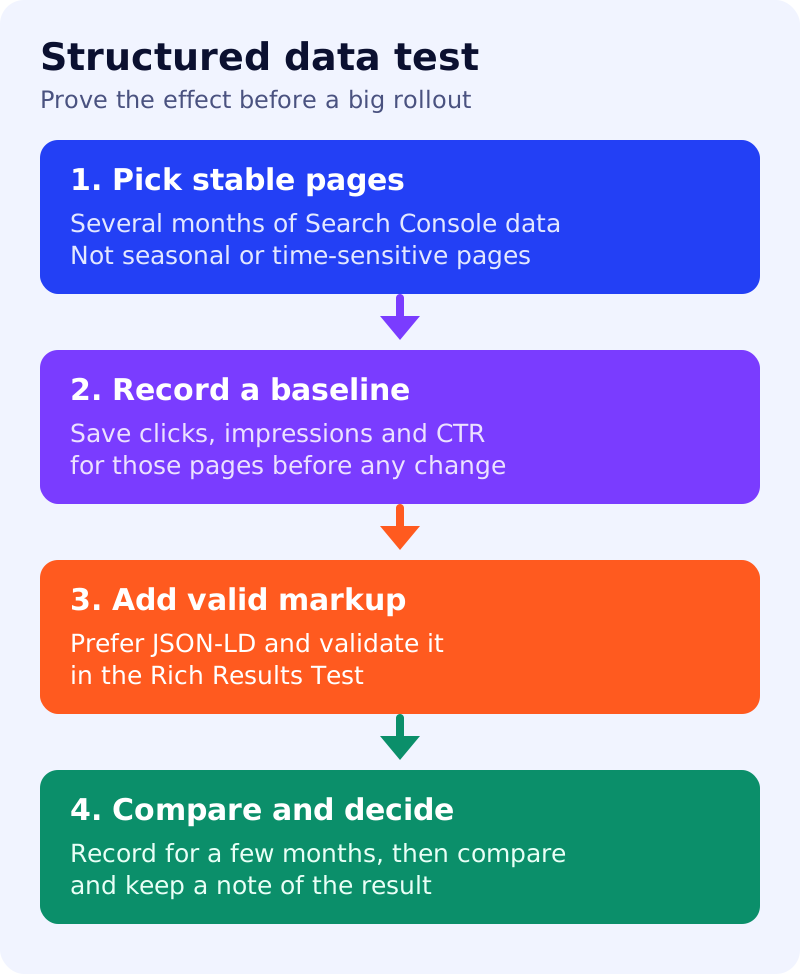
- To measure the effect, run a before and after test on a few pages: choose pages with several months of Search Console data that are not affected by the time of year or timeliness, change little, and are popular enough to give meaningful data. Add the markup, confirm Google finds it with the URL Inspection tool, record performance for a few months in the Performance report (filtering by URL), and compare.
- More recommended properties can make enhanced display more likely, but Google advises focusing on accurate required and recommended ones rather than every possible property.
- Google’s AI features guide adds that there is no special schema you need for AI Overviews or AI Mode.
What to do: rollout plan
| Step | Owner | Time | How to check | Done when |
|---|---|---|---|---|
| 1. Choose one feature | SEO | 30 min | Pick from Google’s gallery for your page type | A single type is chosen |
| 2. Pick 10 test pages | SEO | 45 min | At least several months of data, stable content | A list with URLs |
| 3. Record a baseline | Analyst | 30 min | Clicks, impressions, CTR and position per page | A dated export |
| 4. Add JSON-LD | Developer | 2 hours | Values match visible text | Markup is live on the ten pages |
| 5. Validate | Developer | 30 min | Rich Results Test, no errors | No critical errors |
| 6. Confirm Google sees it | SEO | 30 min | URL Inspection, then Search Console reports | Markup is detected |
| 7. Record for a few months, then compare | Analyst | 1 hour a month | Same metrics, same pages, same period type, filtered by URL | A written result after a few months, good or bad |
| 8. Roll out or stop | Lead | 30 min | Decide with the evidence | A recorded decision |
A worked example (made-up)
A recipe blog tests Recipe markup on ten evergreen posts. Its baseline CTR is 2.1% and, after three months of recording, 2.6%. That is a gain on ten pages, not proof for the whole site, so the team extends to thirty more pages and keeps measuring.
Common mistakes
- Choosing pages that were already trending, which hides the effect.
- Marking up facts that do not appear on the page.
- Measuring for three days, or for a few weeks. Google’s guidance is to record performance for a few months.
- Buying “AI schema” for AI features. See AI features and your website.
Related: structured data policies and the schema decision table. Markup does not guarantee a rich result.