How to Verify Your Physical Business on ChatGPT: Store, Office and Local Business Guide
If you own a shop, restaurant, clinic, salon, hotel, office or another business that customers visit in person, you may want to claim its profile on ChatGPT.
OpenAI’s Business Hub gives eligible businesses a way to claim and manage business information. However, the process for physical businesses is not the same as the process for an online company with a website.
There is an important restriction in OpenAI’s current Help Center: local stores and restaurants can currently claim only an existing US listing.
That means a business owner should first check whether the business is eligible and whether the correct listing already exists. A local business should not assume it can create a new listing simply because it has a website or a Google Business Profile.
This guide explains the current process, what to do if your listing appears, how verification works and what physical businesses outside the United States need to know.
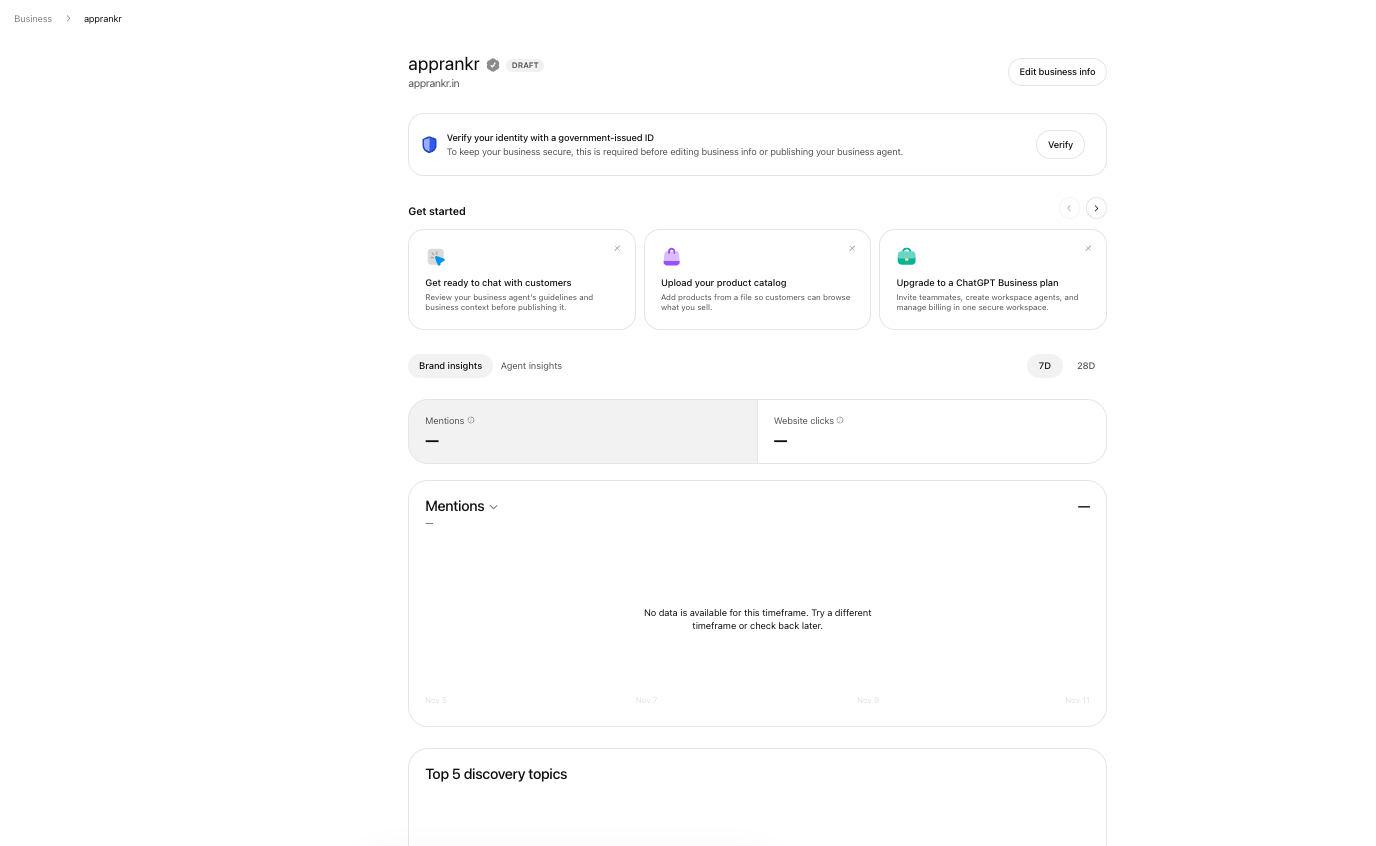
The Business Hub dashboard displays the profile and the actions available to its authorised manager.
Can a physical business be verified on ChatGPT?
Eligible physical businesses may be able to claim a listing through Business Hub, subject to OpenAI’s location, business type and verification requirements.
The current Help Center makes a specific distinction:
- Eligible online businesses may see an option to add a business if it cannot be found.
- Local stores and restaurants can currently claim only an existing US listing.
This distinction matters for businesses in India and other markets outside the United States. Having a real shop, office, clinic or restaurant does not automatically mean that the business can claim a profile through the current local business flow.
If you operate an online business without a customer facing location, read our separate guide to verifying an online business on ChatGPT.
What counts as a physical business?
For this guide, a physical business is one that operates from a real location or serves customers at a location.
Examples include:
- Retail shops and showrooms
- Restaurants and cafes
- Clinics and healthcare facilities
- Salons and gyms
- Hotels and other accommodation businesses
- Offices that receive customers
- Local service businesses with an eligible business listing
These examples describe common physical business models. They do not mean that every category is currently eligible to claim a listing.
Step 1: Check whether your location and business type are eligible
Before preparing documents, read the current Business Hub guidance.
OpenAI says eligibility depends on factors including location, business type and verification support. Its Help Center says local stores and restaurants can currently claim only an existing US listing.
If your physical business is in India, do not assume that the US local listing process is available. Check the options presented in Business Hub. If the platform does not offer a claim route for your business, do not try to bypass the restriction by selecting an unrelated business type or entering a false address.
Step 2: Open Business Hub and search for the exact business
If your business is eligible, sign in to ChatGPT using the account that the owner or authorised representative will manage.
Open Business Hub from the ChatGPT sidebar and search for the business by its actual name.
If a matching listing appears, inspect it carefully.
Check:
- Business name
- Website
- Address
- Business category
- Other identifying information
Make sure it is your business and not another company with a similar name.
OpenAI’s current instructions say local stores and restaurants can claim only an existing US listing. If your local business is not listed, the add business option may not be available to you.
Step 3: Select the correct listing and start the claim
Choose the listing that matches your business.
Confirm the ChatGPT account you want to use to manage the profile. The person submitting the claim must own the business or be authorised to represent it.
Do not claim a competitor’s profile, a former employer’s business or a location you do not manage.
OpenAI’s policy requires accurate information and prohibits impersonation, fake profiles and misleading claims about ownership or affiliation.
Step 4: Choose the verification method shown
Business Hub will show the verification options available for the selected business.
OpenAI’s Help Center documents several possible methods.
Verify by business phone
If Business phone is available:
- Select Business phone.
- Choose SMS or an automated call.
- Select Get code.
- Enter the code sent to the number displayed.
Use a number that the business controls. If the number is incorrect or inaccessible, do not enter a code received for a different business.
Verify by business email
If Business email is available:
- Select Business email.
- Choose Get code.
- Open the business mailbox.
- Enter the code supplied by OpenAI.
Use an email address associated with the business and accepted by the verification flow.
Verify by website domain
If Website domain appears:
- Select the option.
- Copy the TXT record generated by ChatGPT.
- Open the DNS settings for the business website.
- Add the TXT record with the exact host and value shown.
- Save the record.
- Return to ChatGPT and select Verify domain.
This method checks control of the website domain. It does not by itself prove that you own the physical premises or complete Persona identity verification.
Verify through Shopify
If the business uses Shopify and the option is offered, select Shopify store, connect the correct store and follow the login and permission prompts.
Not every physical business will see every verification method. Use only the options offered for your listing.
Step 5: Submit the claim and wait for review
After completing the selected method, submit the claim.
OpenAI says it reviews the request and sends an email with the decision or a request for more information.
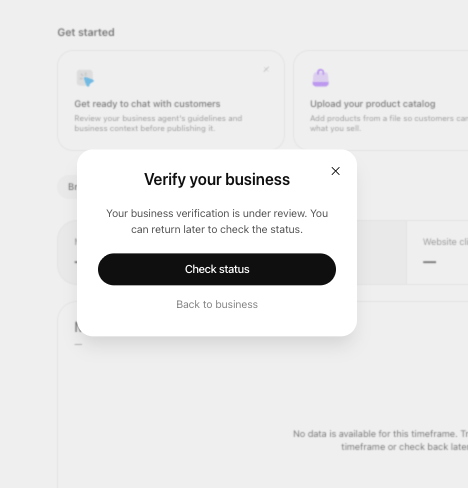
Submitting a claim does not mean it is approved immediately. OpenAI may review it and request more information.
If your listing is locked, use the Contact support option shown in Business Hub.
If someone else has already claimed the profile, use the ownership dispute process rather than creating another listing.
Step 6: Complete Persona identity verification
Claim verification is separate from Persona identity verification.
After the claim is approved, OpenAI may require Persona verification before you can publish changes, view insights, connect a product feed or create an eligible Business Agent.
The process may request:
- A government issued identity document
- Business registration information
- Proof that you are authorised to represent the business
The person completing the check should be an owner or an authorised representative. Submit genuine and current documents.
OpenAI says the blue verified badge appears after Persona verification is approved. A successful phone, email or domain check alone does not automatically provide the blue badge.
Step 7: Review the physical business profile
After the necessary approvals, review the information in Business Hub.
Make sure the details are correct:
- Public business name
- Physical address, where applicable
- Opening hours
- Phone number and website
- Business category
- Description of products or services
- Service area, if relevant and supported
- Logo and business photographs
Check the details against the information customers see on your website, signage and other official business channels.
If your opening hours change during holidays or seasons, keep the profile updated where the feature is available.
Do not add a service, qualification, location or customer promise that the business cannot substantiate.
What if your physical business is in India?
This is the most important point for Indian shop owners and local businesses.
OpenAI’s current Help Center says local stores and restaurants can claim only an existing US listing. It does not provide a general promise that local businesses in India can claim or create a physical location profile through the same flow.
If you operate a shop, clinic, restaurant or office in India:
- Open Business Hub and check the options actually offered for your business.
- Do not select a different country or enter a false address to pass eligibility checks.
- Keep your official website and business information accurate.
- Make sure your public business details are consistent across trusted platforms.
- Recheck OpenAI’s official guidance as availability changes.
Your business information may still be available to ChatGPT from public sources. That is different from having a claimed and verified profile that you manage.
What if your physical business is not listed?
For local stores and restaurants, OpenAI’s current Help Center says the claim process is limited to an existing US listing.
If you cannot find your listing:
- Check the business name and spelling.
- Confirm that you are searching for the correct location.
- Check the latest eligibility guidance.
- Do not create a duplicate or claim another company’s listing.
- Contact OpenAI support if Business Hub provides that option.
The add business route described for eligible online businesses should not be assumed to apply to a physical store or restaurant.
Common verification problems
| Problem | What to do |
|---|---|
| My shop does not appear | Check the exact business name and current location eligibility |
| I am in India and cannot claim my store | OpenAI currently documents local store and restaurant claims for existing US listings only |
| Someone else has claimed my listing | Use the ownership dispute process |
| Phone verification fails | Check the displayed number and whether it can receive SMS or calls |
| Business email code is missing | Check spam and confirm access to the accepted business mailbox |
| Website TXT verification fails | Recheck the exact record, DNS provider and propagation time |
| My claim is under review | Wait for OpenAI’s email and respond to any request |
| I have claimed the listing but no blue badge appears | Complete Persona identity verification if requested |
Does a verified physical business rank higher in ChatGPT?
OpenAI does not promise that a claimed or verified business will receive higher placement, more mentions or more customers.
Verification helps an eligible business manage its information. ChatGPT continues to make independent recommendations and comparisons.
For a physical business, accurate information is essential. Keep the address, opening hours, phone number, services and website consistent. Make sure the website explains what customers can expect before they visit.
Frequently asked questions
Can I verify my shop on ChatGPT?
OpenAI currently says local stores and restaurants can claim only an existing US listing. Check Business Hub to see whether your business is eligible and whether the correct listing is available.
Can an Indian restaurant claim its ChatGPT business profile?
OpenAI’s current Help Center does not describe a general local listing claim route for Indian restaurants. It currently limits local store and restaurant claims to existing US listings. Check the official guidance for changes.
Can I create a new listing for my physical shop?
Do not assume that you can. OpenAI says local stores and restaurants can currently claim only an existing US listing. The add business option is described for eligible online businesses.
Is a Google Business Profile enough to verify my ChatGPT business?
No. A Google Business Profile is a separate platform. ChatGPT Business Hub has its own claim and verification process.
Do I need a website to claim a physical business?
The methods offered depend on the business and its eligibility. OpenAI may offer phone, business email, website domain or Shopify verification. Follow the options displayed in your Business Hub claim.
Does the blue tick appear after phone verification?
No. OpenAI says the blue verified badge appears after Persona identity verification is approved. Claim verification and Persona verification are separate steps.
Can a physical business create a Business Agent?
Business Agents have separate eligibility requirements. OpenAI currently says they are available to eligible ecommerce and online service businesses in the United States. A physical business profile claim does not automatically make the business eligible for an Agent.
Read the main ChatGPT business verification guide
For the complete process and a comparison of online and physical business verification, read How to verify your business on ChatGPT: Step-by-step guide.
If your business operates only through a website and has no customer facing store, read How to verify your online business on ChatGPT.