

Video can appear in text results, in video results and in features that jump to a moment in a video. Google’s video documentation (last updated 24 September 2026 as we read it) says what a watch page must tell Google.
Best for: video producers, publishers with embedded video, and SEO teams.
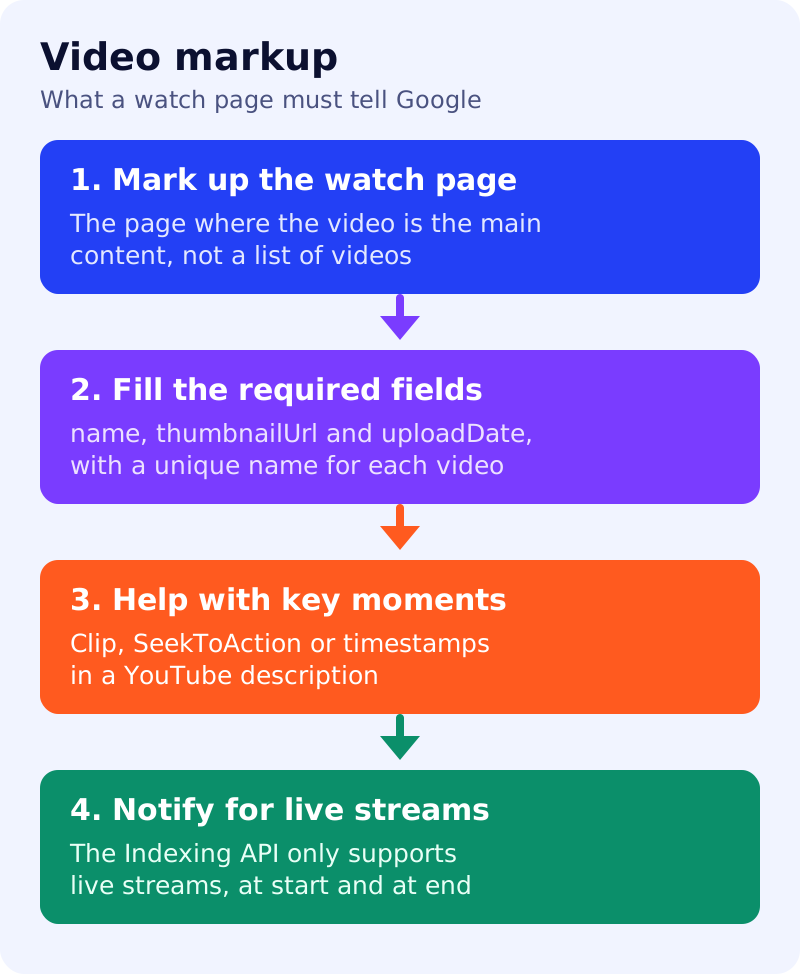
What Google says
- Video markup can influence what shows in video results: description, thumbnail, upload date and duration. It applies to watch pages.
- Required properties for VideoObject:
name(unique text for each video),thumbnailUrlanduploadDatein ISO 8601 format. - Google’s examples also include
duration,contentUrl,embedUrlandcreator. Google’s updates page for 24 September 2026 records that thecreatorproperty was added, noting support forauthor. - Key moments let users navigate segments like chapters. Google can detect them automatically but prefers those you set through
CliporSeekToActionstructured data, or through timestamps in a YouTube description. - For YouTube timestamps: use
[hour]:[minute]:[second](hours optional), put the label on the same line, one timestamp per line, link each timestamp to the point in the video, keep labels to at least one word and list them in order. ClipandSeekToActionneed a video that can deep link to a point other than the start.- A
BroadcastEventcan earn a LIVE badge. For livestreams, Google asks you to call the Indexing API when the video goes live, when it stops and the markup is updated with an end date, and when the markup changes. The Indexing API supports livestream videos only. - Following the Search Essentials, structured data guidelines and video indexing requirements is required for eligibility. Misuse can lead to a manual action.
What to do: five steps
| Step | Owner | Time | How to check | Done when |
|---|---|---|---|---|
| 1. Pick the watch pages | SEO | 30 min | A page whose main content is one video | A list of 10 URLs |
| 2. Add the required fields | Developer | 1 hour | Rich Results Test | name, thumbnailUrl, uploadDate valid on all ten |
| 3. Make every name unique | Content | 30 min | Sort names in a spreadsheet | No duplicates |
| 4. Add key moments | Video editor | 1 hour | Clip markup, or timestamps in the YouTube description | Moments are listed in order |
| 5. Handle live streams | Developer | 2 hours | Indexing API calls at start, end and on change | Test stream triggers the three calls |
Common mistakes
- Marking a page with five videos as if it were one watch page.
- Reusing the same title for a series of videos.
- Timestamps out of order or without labels.
- Using the Indexing API for videos that are not live.
See also our schema decision table and JavaScript SEO check. Results are not guaranteed, and we did not test the Indexing API.