

Readers trust a date only if it is honest. So do search systems. Google’s byline date guidance (last updated 10 December 2025 as we read it) explains how dates are determined, and its helpful content guidance warns against faking freshness.
Best for: blogs and publishers with posts that age.
What Google says
- A byline date is the date Google estimates a page was published or significantly updated. Google does not rely on a single factor and does not guarantee a date will appear in results.
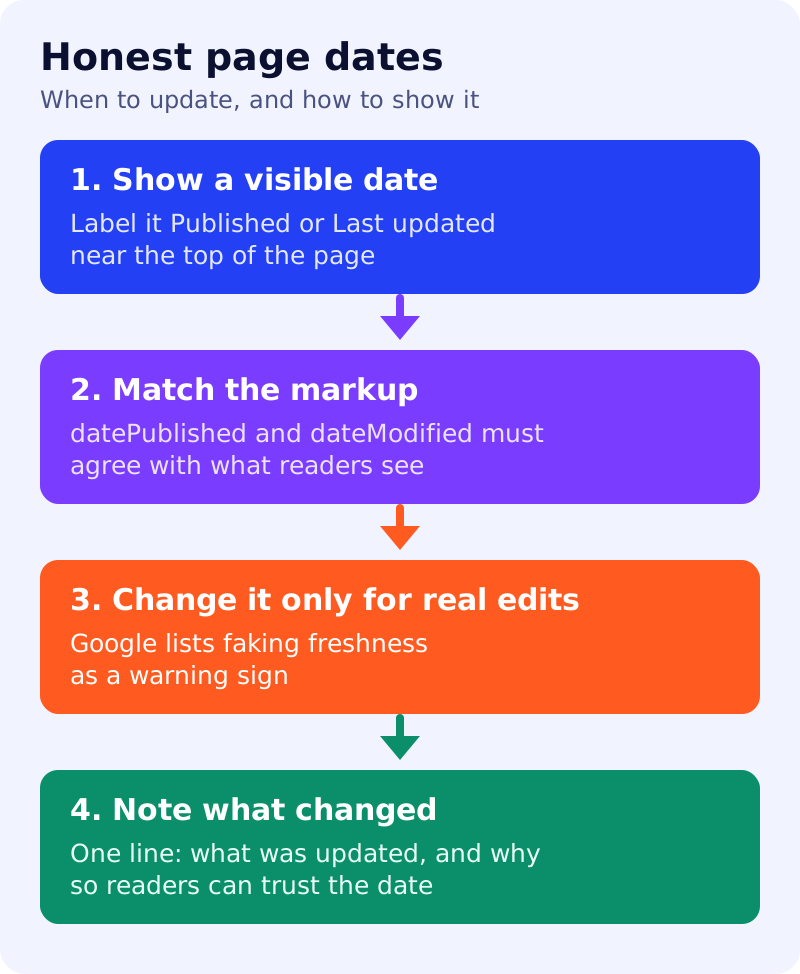
- Add a user-visible date and feature it prominently, labelled with text like “Published” or “Last updated”.
- Also add
datePublishedanddateModifiedin structured data on a CreativeWork subtype such as Article. - Keep visible and structured dates consistent. The date is required, the time is not, and any timezone given should be correct.
- Do not use future dates, or the date of an event described on the page. Dates must describe when the page was published or updated.
- If wrong dates are picked, reduce other dates on the page.
- Google’s helpful content questions include: are you changing the date of pages to make them seem fresh when the content has not substantially changed?
A simple refresh policy (our view)
| Situation | Action | Date |
|---|---|---|
| Typo or link fix | Fix it | Leave unchanged |
| A fact, price or screenshot changed | Update the page | Change “Last updated” |
| The page is now wrong or obsolete | Rewrite or retire | Change date and add a note |
| Nothing is wrong | Leave it | Leave unchanged |
A worked example (made-up)
A 2024 post on a tool’s pricing now lists the wrong plans. The writer updates the table, adds “Last updated 10 November 2026: plans and prices rechecked”, and changes dateModified to match. A different post only had a broken link fixed, so its date stays.
What to do
- Check that the date you show matches the date in your markup.
- Add a “Last updated” line only where it means something.
- Review your oldest ten traffic pages and apply the table above.
- See Article schema that matches the page and our search traffic drop routine.
Updating a page does not guarantee a ranking change.