
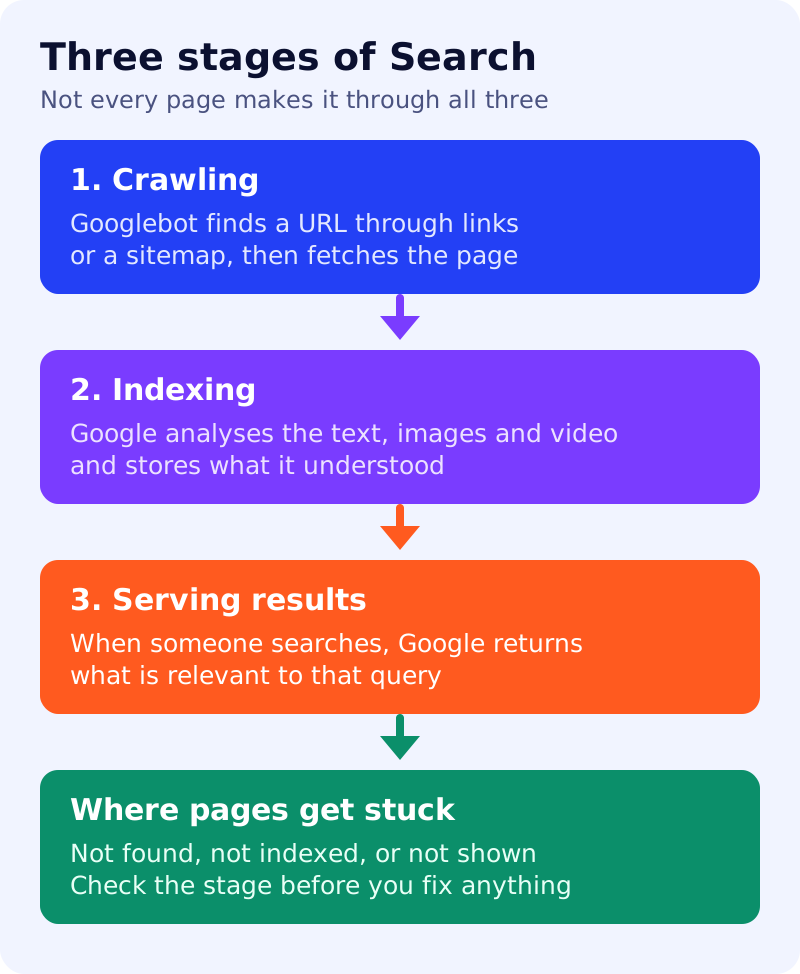
When a page does not show up, most people start rewriting it. A better first question is where it stopped. Google’s in-depth guide (last updated 18 December 2025 as we read it) describes three stages, and each fails for different reasons.
Best for: site owners who want a clear mental model before they change anything.
What Google says
- Crawling. Google finds URLs through links from known pages and through sitemaps, then Googlebot fetches them. Google decides which sites to crawl, how often and how many pages to fetch. It tries not to crawl too fast, and server errors such as HTTP 500 signal it to slow down.
- Indexing. Google analyses the text, images and video on the page and stores the result in its index.
- Serving. When someone searches, Google returns information relevant to that query.
- Not every page makes it through each stage. Google does not guarantee that it will crawl, index or serve a page, even if the page follows its Search Essentials.
- Google does not accept payment to crawl a site more often or rank it higher.
Google’s generative AI guide (updated 10 July 2026) adds a related point: to appear in AI features, a page must be indexed and eligible to show in Search with a snippet. So the three stages apply to AI answers too.
Our view: match the symptom to the stage
| Symptom | Likely stage | First check |
|---|---|---|
| New page not found at all | Crawling | Is it linked from a crawled page? Is it in the sitemap? |
| Page crawled but not in results | Indexing | Is there a noindex tag, a duplicate, or very thin content? |
| Page indexed but never shown for your topic | Serving | Does it answer the query better than what already ranks? |
| Server slow or erroring | Crawling | Check status codes and server logs |
A worked example (made-up)
A shop adds a guide, waits two weeks and sees nothing. The guide has no internal links and is missing from the sitemap. That is a crawling problem, so rewriting the text would change nothing. Adding two links from the category page and a sitemap entry fixes the stage that was failing.
What to do
- Name the stage before you fix anything.
- Use the URL Inspection tool in Search Console to see what Google found for one URL.
- Fix crawling first: links, sitemap, server health. See XML sitemaps and links Google can crawl.
- Then indexing: duplicates and noindex. See canonical URLs.
- Only then rework the content. See search traffic drop routine.
Results are not guaranteed.