
If Google can read an article that a visitor cannot, that can look like cloaking. Google’s paywalled content documentation (last updated 8 September 2026 as we read it) exists to separate a legitimate paywall from that practice.
Best for: publishers and membership sites that charge for some or all of an article.
What Google says
- The CreativeWork markup helps Google differentiate paywalled content from cloaking, which violates its spam policies.
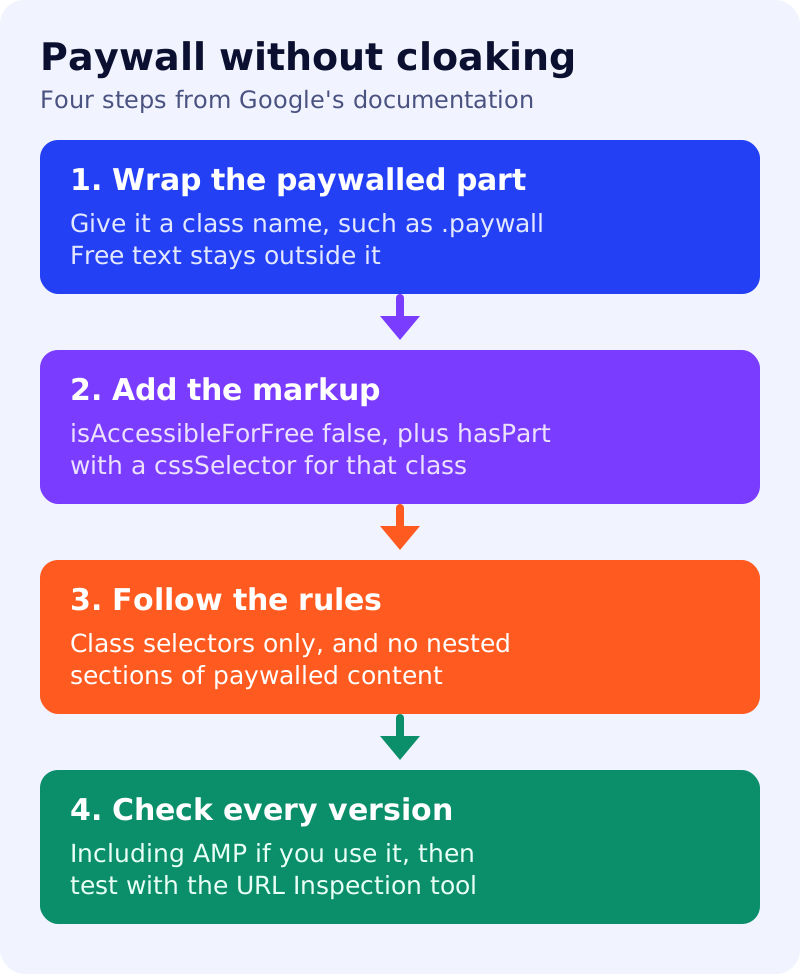
- Wrap each paywalled section in a class name, then add markup with
isAccessibleForFreeset to false and ahasPartentry whosecssSelectorpoints to that class. - Use only
.classselectors, and do not nest content sections. - Follow the steps for all versions of the page, including AMP and non-AMP.
- If you do not want the content to be accessible to the browser at serving time, choose a paywall implementation that does not supply it to the browser. For client-side JavaScript paywalls, Google points to its JavaScript guidance.
- Breaking these guidelines may make a page ineligible to appear in results.
A minimal pattern
<p>This part is visible to everyone.</p>
<div class="paywall">This part needs a subscription or registration.</div>
In the article’s JSON-LD, set "isAccessibleForFree": false and add "hasPart": {"@type": "WebPageElement", "isAccessibleForFree": false, "cssSelector": ".paywall"}. Check Google’s page for the exact current example.
A four-step test
| Step | Pass if |
|---|---|
| Wrap | The paywalled text sits inside one class and the free text does not |
| Markup | The selector matches that class exactly |
| Rules | No nested sections, and only class selectors |
| Versions | Every version of the page carries the same markup |
What to do
- Decide how much of each article is free. A readable free opening helps both readers and search.
- Apply the steps above and validate with the Rich Results Test.
- Inspect one article with the URL Inspection tool to see what Google received.
- Do not show Googlebot different content from visitors beyond what the markup describes. See our spam policy self-audit.
- Check your structured data against Google’s policies.
Our view: whatever sits behind the paywall cannot be quoted from your page, so make sure the free part states the answer or the finding clearly.