
Many AEO plans start with a special file, a special markup or a special prompt format. Google’s own page on AI features starts somewhere simpler. This post turns that page into work a team can assign and finish.
Best for: SEO leads, AEO owners, content managers and developers who need one shared checklist.
What Google says
From “AI features and your website”, last updated 10 December 2025 as we read it:
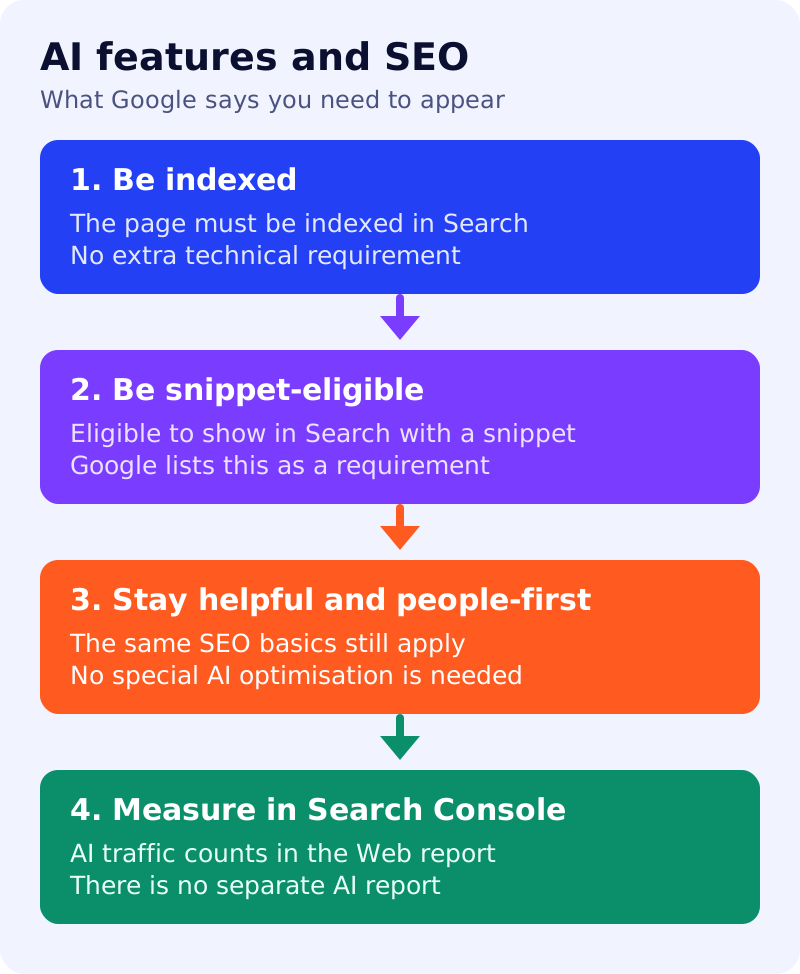
- The best practices for SEO remain relevant for AI Overviews and AI Mode. There are no additional requirements to appear, and no other special optimisations are necessary.
- To be a supporting link, a page must be indexed and eligible to be shown in Google Search with a snippet. There are no additional technical requirements.
- Meeting all requirements does not guarantee crawling, indexing or serving.
- You do not need new machine-readable files, AI text files or markup, and there is no special schema.org data to add.
- Both features may use “query fan-out”: several related searches across subtopics. See our query fan-out explainer.
- AI Overviews appear only when Google’s systems judge them additive to classic Search, so they often do not trigger.
- Traffic from these features is counted in Search Console’s Performance report, under the “Web” search type.
What to do: step by step
| Step | Owner | Time | How to check | Done when |
|---|---|---|---|---|
| 1. Confirm key pages are indexed | SEO | 30 min | URL Inspection in Search Console for 10 priority pages | All ten show as indexed |
| 2. Confirm they can show a snippet | SEO, developer | 20 min | Look for nosnippet or max-snippet:0 in the page source and headers | None found on pages you want cited |
| 3. Allow crawling at every layer | Developer | 30 min | Check robots.txt, CDN and firewall rules for Googlebot | Googlebot gets a 200 on all ten |
| 4. Put important facts in text | Content | 1 hour | View the page with scripts off | Key answers appear as text |
| 5. Match structured data to visible text | Developer | 45 min | Compare each markup value with the page | No mismatch |
| 6. Keep Merchant Center and Business Profile current | Ecommerce, local | 30 min | Compare prices, hours and addresses | Everything matches the site |
| 7. Set a measurement baseline | SEO | 30 min | Save a Web-type Performance export | A dated export exists |
Common mistakes
- Buying “AI schema” work. Google says no special schema is needed. Spend that time on steps 1 to 4.
- Blocking snippets site-wide. A page not eligible for a snippet is not eligible as a supporting link.
- Expecting a separate report. Google counts these features inside the Web report. Our AI referral tracking guide covers the analytics side.
Our view
Treat AI features as a reason to check fundamentals again, not as a new channel with separate rules. Run the seven steps once a quarter, then use our 20-prompt visibility test to see what AI tools say about your brand.
Results are not guaranteed, and this checklist is not an official Google process.