

How to Verify Your Online Business on ChatGPT Without a Physical Store
Do you run a business through a website but do not have a shop, office or customer facing location? You may still be able to claim your business on ChatGPT.
OpenAI’s Business Hub allows eligible businesses to claim and manage their business information. Its Help Center says that when an eligible online business cannot find its listing, it may see an option to add the business.
This is different from the current process for local stores and restaurants, which OpenAI says can claim only an existing US listing.
For an online only company, the website domain verification option is especially relevant. It asks you to add a DNS TXT record to the domain so OpenAI can check that you control it.
This guide explains how the process works, what information to prepare, how to add the TXT record and what to do if verification fails.
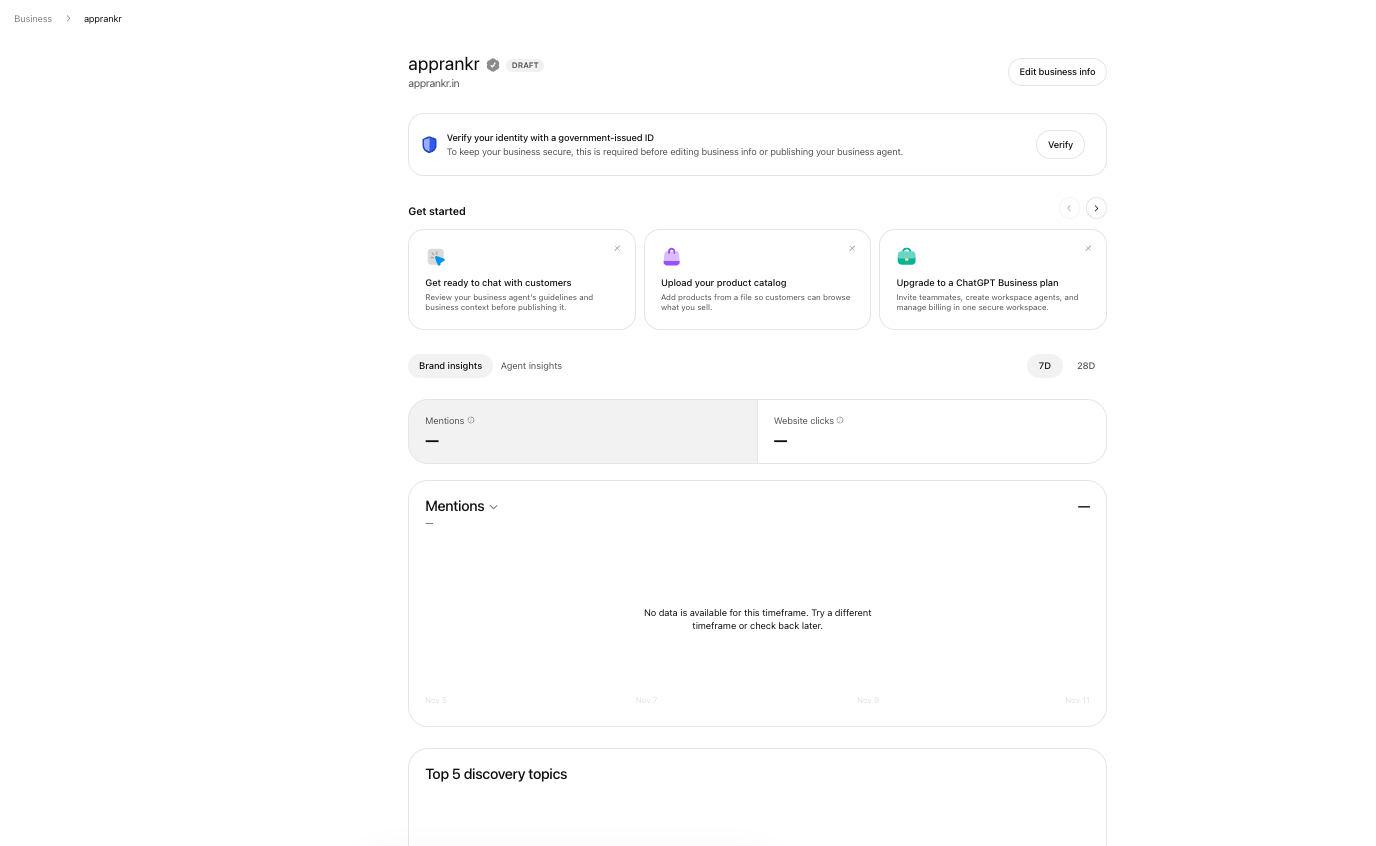
The dashboard is where an eligible online business can manage its claimed profile and available features.
Important: Having a website does not automatically make a business eligible. OpenAI considers factors including location, business type and verification support. Follow the options shown in your own Business Hub account.
Can you verify an online business without a physical address?
Potentially, yes, if the business is eligible.
OpenAI’s current Help Center says an eligible online business may be offered the option to add a business when it cannot find an existing listing.
A business does not need to invent a shop address or use a residential address simply to appear more established. Provide accurate business information and only enter an address or service area if it genuinely applies and the form requests it.
Examples of businesses that may operate online include:
- Ecommerce brands that sell through their own websites
- Software companies and SaaS providers
- Online education and training businesses
- Digital marketing and consulting companies
- Online service providers
- Businesses that sell products through a website without a customer facing shop
These are examples of business models, not a guarantee that every company in these categories will be eligible.
What you should prepare before starting
Keep the following information ready:
- Your exact business or brand name.
- The official website URL.
- Access to the domain’s DNS settings.
- A business email address, if available.
- Access to the business phone number, if available.
- Shopify administrator access, if you use Shopify and the option is offered.
- Documents that show your identity and authority to represent the business, if Persona requests them.
The domain’s DNS may be managed by your domain registrar, hosting company or a separate DNS provider. For example, your domain may be registered with one company while its DNS is managed through Cloudflare or another service.
You need access to the service that actually manages the DNS records.
Step 1: Open Business Hub and search for your company
Sign in to ChatGPT using the account that will manage the business.
Open Business Hub from the ChatGPT sidebar. Start the claim process and search for your business by its actual name.
If you find the correct listing, select it and check that the website and business details match.
If the business does not appear, look for the option to add a business. OpenAI says this option may be available to eligible online businesses.
If you do not see the option, do not create a duplicate profile or choose a different business type to get around the restriction. Eligibility is controlled by OpenAI.
Step 2: Choose website domain verification
If ChatGPT offers Website domain as a verification method, select it.
Business Hub will generate a DNS TXT record for your claim. The record contains information that OpenAI can use to check control of the domain.
You will see details such as:
- Record type, usually TXT
- Host or name
- TXT value
Keep the verification screen open or copy the values accurately. The record must match the details generated for your claim.
Do not use a TXT value copied from another company’s tutorial. Your value is specific to your verification process.
Step 3: Open your domain’s DNS management
Log in to the service that manages your website domain’s DNS records.
The exact steps differ by provider. You may find DNS settings under names such as:
- DNS management
- DNS records
- Zone editor
- Manage DNS
- Advanced DNS
Find the option to add a new record.
Select TXT as the record type. Enter the host or name and the value exactly as shown in ChatGPT.
For example, if the interface asks for a host and a value, copy both fields from the Business Hub screen. Do not replace the generated value with a guessed code.
Save the record.
If another person or agency manages your domain, send them the exact record details and ask them to add it. You do not need to share your ChatGPT password with the developer or agency.
Step 4: Return to ChatGPT and verify the domain
After saving the TXT record, return to Business Hub.
Select Verify domain and follow any additional instructions.
DNS updates are not always visible immediately. If the record is not detected, allow time for the change to propagate and try again.
If it continues to fail, check the record carefully:
- Is the record type TXT?
- Does the host or name match the value requested by ChatGPT?
- Was the full TXT value copied without missing characters?
- Was the record added to the correct domain?
- Is the DNS service you edited the one currently authoritative for the domain?
- Did the provider automatically add the domain name to the host field, creating an incorrect duplicate?
Do not delete unrelated DNS records. Do not change your website’s A, AAAA, MX or email authentication records as part of this verification unless your DNS administrator has a separate, specific reason to do so.
Step 5: Check other verification methods
Website domain verification may not be the only option. Depending on your business and the claim, Business Hub may offer other methods.
Business email
If offered, select Business email and request a code. Enter the code sent to the business email address.
Business phone
If offered, select Business phone. Choose SMS or an automated call and enter the code you receive.
Shopify
If you operate a Shopify store and the option appears, select Shopify store and connect the correct store. Review the permissions and complete the login process.
Use only the methods shown in your account. The available methods are not necessarily the same for every business.
Step 6: Wait for the claim decision
After completing the verification step, submit your claim.
OpenAI says it reviews the request and emails its decision or asks for more information.
If the claim is approved, you can access the business profile in Business Hub. This does not necessarily complete every verification requirement.
Step 7: Complete Persona identity verification if requested
OpenAI separates the claim verification process from identity verification.
Persona identity verification may be required before you can publish changes to business information, view insights, connect a product feed or create an eligible Business Agent.
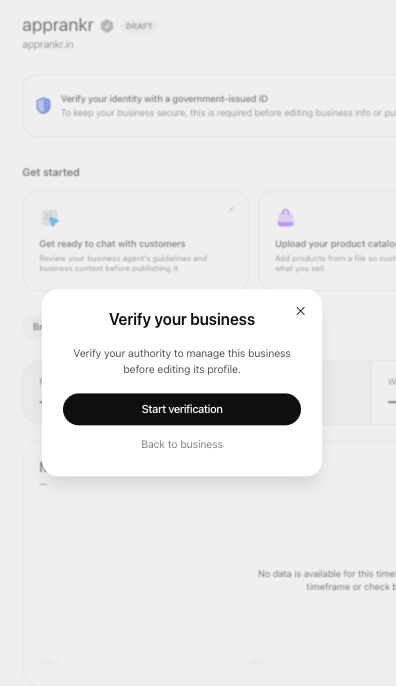
Domain control and personal identity checks serve different purposes in the verification process.
You may be asked for a government issued identity document, business registration details and proof that you are authorised to represent the business.
Complete the process using genuine information. If the company has multiple owners or representatives, the person submitting the information should have the authority to do so.
OpenAI says the blue verified badge appears after Persona verification is approved. It does not appear simply because you added a DNS record or submitted a claim.
Step 8: Complete your online business profile
Once the required approvals are complete, review the information available in Business Hub.
Make sure the following details are accurate:
- Business name and website
- Clear description of what the company offers
- Correct product or service category
- Product details and pricing, where applicable
- Delivery and return policies, where applicable
- Logo and other business images
- Contact information
If you sell products, check whether a product feed is available for your business. OpenAI says retailers can provide product information, pricing and availability. A product feed does not guarantee that ChatGPT will recommend a product.
What if you do not have a physical address?
Do not create a fictional address.
A website based business should describe its operations accurately. If it serves customers online, explain that clearly. If it has a legitimate service area, use it only where the profile form supports it and the information is correct.
The key is to distinguish between a business address, a registered office and a customer facing store. They are not interchangeable.
If Business Hub asks for an address that you do not have, do not enter a random location to complete the form. Check the eligibility guidance or contact OpenAI support.
Online business verification problems and fixes
| Problem | What to do |
|---|---|
| My business website is not found | Check the spelling and try the official brand name. See whether Add business is offered |
| I cannot see Add business | Your business type or location may not be eligible for that route |
| TXT record is not detected | Recheck the host, value, DNS provider and domain. Allow time for DNS propagation |
| My website is on Shopify | Check whether Connect Shopify is offered and use the official connection flow |
| I only have a personal email | Check whether Business email verification is available and what address the flow accepts |
| I do not have a physical store | Do not invent an address. Follow the online business route if eligible |
| Claim is pending | Wait for the email from OpenAI and provide any requested information |
| Persona verification is not approved | Review the requested identity and business authority documents and follow the support process |
Does verifying an online business help it appear in ChatGPT answers?
Claiming your profile can help you manage the business information shown in ChatGPT. It does not guarantee that ChatGPT will mention, recommend or rank your company.
OpenAI says ChatGPT may show information about a business even if that business has not created a Business Agent. It also says claiming does not guarantee higher placement or sales.
For better business information, keep your website clear and current. Explain your products, pricing, policies, service areas and contact options. Make sure the details agree across your website and other official sources.
Frequently asked questions
Can I register my online business on ChatGPT without a shop?
An eligible online business may be able to claim an existing listing or add a business through Business Hub. The option depends on OpenAI’s eligibility checks and the business’s location and type.
Can I verify my website using DNS?
If Business Hub offers Website domain verification, it will provide a TXT record. Add that exact record to your domain’s DNS settings and return to ChatGPT to verify.
Do I need a business email address?
Business email may be one of the verification options. The methods offered can vary. Website domain, phone or Shopify may also be available for some businesses.
Can a freelancer or consultant claim a business?
Eligibility depends on OpenAI’s business type and verification requirements. Do not assume that every individual professional or freelancer qualifies. Check the options presented in Business Hub.
Can an Indian online business claim a profile?
OpenAI says eligible businesses in places where ChatGPT is available can claim a business. Eligibility depends on location, business type and supported verification. Check whether Business Hub offers the claim or add business route for your company.
Is website domain verification the same as Persona verification?
No. A DNS TXT record checks control of the website domain. Persona is a separate identity verification step that may be required before certain profile management and insight features are available.
Does adding my business guarantee a Business Agent?
No. Business Agents have separate eligibility requirements. OpenAI currently says they are available to eligible ecommerce and online service businesses in the United States.
Read the complete ChatGPT business verification guide
For the overall process, verification methods and the differences between online and physical businesses, read How to verify your business on ChatGPT: Step-by-step guide.
If your company has a shop, restaurant, office or other physical location, see How to verify a physical business on ChatGPT.