

Forum posts carry first-hand experience, which is why they appear in many answers. Google’s documentation (last updated 8 September 2026 as we read it) says how a community site should describe its posts.
Best for: forum owners, community platforms and product teams with user discussion pages.
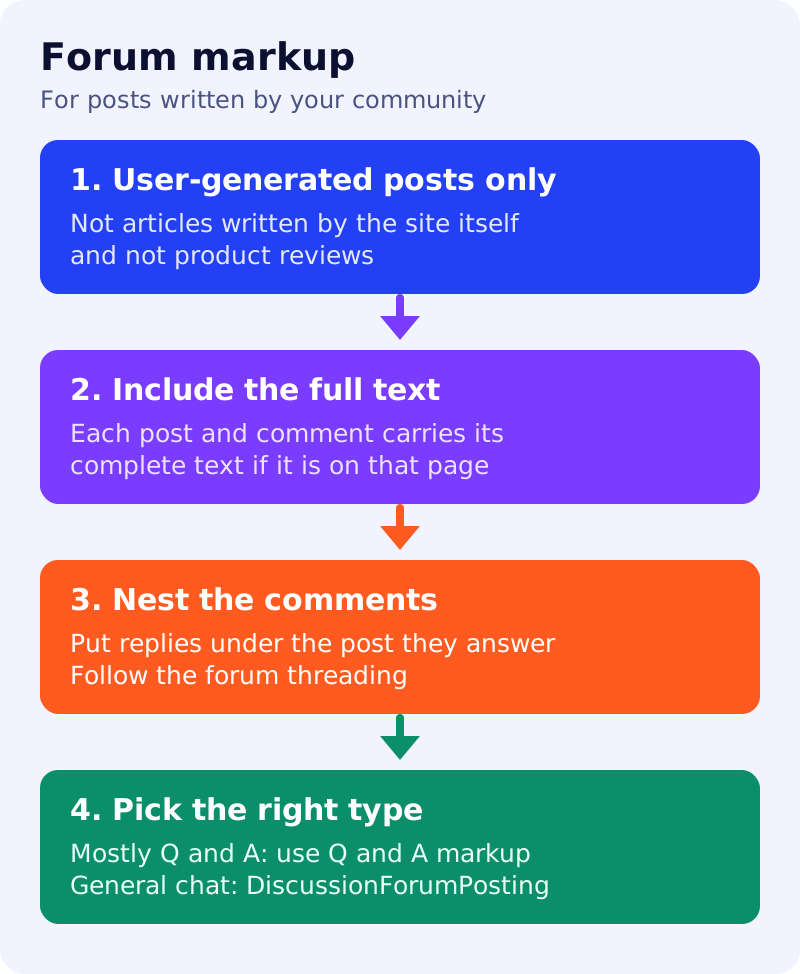
What Google says
- Discussion forum markup is for forum-style sites where people share first-hand perspectives. It helps Google identify online discussions.
- Use
DiscussionForumPostingonly for a user-generated post. Do not use it for content mainly written by the site’s publishers or their agents, such as an article with comments or user reviews of a product. - A generic social platform can use
SocialMediaPosting, its parent type, with the same requirements. - If the forum is mostly questions with answers, Google recommends Q&A markup instead. For general discussion,
DiscussionForumPostingis better. - Each post must include its entire text, and each
Commentmust include the entire text of the response if it is on that page. - Nest comments under the post they relate to. On multi-page threads, ideally later pages include the original post with the main page URL. If a URL is mainly about one post, use
mainEntityormainEntityOfPage. - Required:
author(a person or organisation) anddatePublished, plus one oftext,imageorvideo.headlineshould not duplicate or truncate the text if there is no separate title. - The optional
digitalSourceTypeproperty distinguishes human from machine-generated content. Google supportsTrainedAlgorithmicMediaDigitalSource(for example an LLM) andAlgorithmicMediaDigitalSource(for example an automatic reply bot), and assumes content is human-generated if the property is missing. - Google recommends Microdata or RDFa where possible, to avoid repeating large text blocks, though JSON-LD is fully supported.
What to do: step by step
| Step | Owner | Time | How to check | Done when |
|---|---|---|---|---|
| 1. Classify your page types | Product, SEO | 45 min | Thread page, category page, question page | Each type has a markup choice |
| 2. Use the right type per page | SEO | 30 min | Mostly Q and A? Use Q&A. Mixed? Use forum markup | Types are documented |
| 3. Check text completeness | Developer | 45 min | Compare visible post text with markup text | No truncated text |
| 4. Nest the comments | Developer | 1 to 2 hours | Inspect the tree against the page | Replies sit under their posts |
| 5. Handle multi-page threads | Developer | 1 hour | Page 2 of a long thread | The original post is referenced |
| 6. Test five thread pages | SEO | 30 min | Rich Results Test and URL Inspection | Required fields valid |
| 7. Mark machine-generated posts | Community lead, developer | 30 min | Does the platform set digitalSourceType for LLM or bot posts? | Generated posts carry the right value |
Common mistakes
- Marking up a blog post written by your team as a forum post.
- Marking up product reviews as forum posts.
- Putting a clipped excerpt of the post in the markup.
- Keeping spam threads indexed. See control what you share for the noindex options.
Related: author and profile pages. Markup does not guarantee that a thread appears in any feature.