

A news site publishes all day, and a general sitemap changes slowly by comparison. Google’s news sitemap guidance (last updated 10 December 2025 as we read it) describes a way to tell it about fresh articles quickly. This post turns the guidance into a newsroom routine.
Best for: news and magazine publishers, and the developers who run their sitemaps.
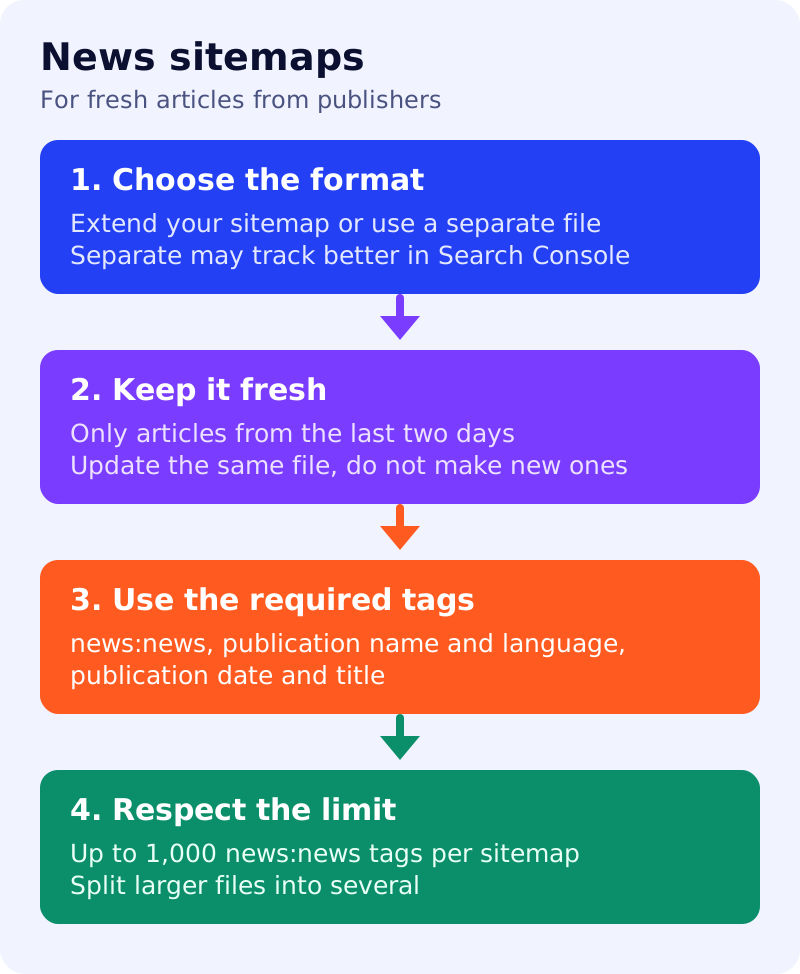
What Google says
- News publishers can use news sitemaps to tell Google about news articles and additional information. You can extend an existing sitemap with news tags or create a separate news sitemap reserved for news articles. Either is fine, though a separate file may allow better tracking of your content in Search Console.
- News sitemaps are based on general sitemaps, so general sitemap best practices also apply.
- Update the news sitemap with fresh articles as they are published. Do not create a new sitemap with each update. Google News crawls news sitemaps as often as it crawls the rest of your site.
- Include only recent URLs for articles created in the last two days. Once articles are older than two days, remove the URLs or remove the
news:newsmetadata from them. - If removal leaves the sitemap empty, Search Console may show an Empty Sitemap warning, which is there to confirm it was intentional. Google says an empty file will not cause problems with Search.
- Required tags:
news:news(one perurl, up to 1,000 per sitemap, so split larger files),news:publicationwithnews:nameandnews:language,news:publication_dateandnews:title. The publication name must exactly match the name as it appears on your articles.
What to do: step by step
| Step | Owner | Time | How to check | Done when |
|---|---|---|---|---|
| 1. Choose the format | SEO, developer | 30 min | Separate file or extension of the main sitemap | One choice, written down |
| 2. Generate from the CMS | Developer | 3 hours | Each new article appears with the five required fields | A test article appears within minutes |
| 3. Set the two-day window | Developer | 1 hour | Articles older than two days drop out | No stale items |
| 4. Match the publication name | Editor | 20 min | Name equals the name shown on articles | Exact match |
| 5. Submit and monitor | SEO | 30 min | Search Console sitemaps report | Status success, no errors |
| 6. Handle quiet periods | SEO | 10 min | An empty file is expected overnight | The Empty Sitemap warning is understood |
| 7. Split if you pass 1,000 items | Developer | 1 hour | Count news:news tags | No file over the limit |
Common mistakes
- Keeping weeks of articles in the news sitemap.
- Generating a new sitemap file with each update.
- Using a short brand name in
news:namewhen articles use a longer one. - Treating the Empty Sitemap warning as a failure.
Related: XML sitemaps for a blog, preferred sources and how Google Search works. Inclusion is not guaranteed.