

A video can fail for reasons that have nothing to do with the video. Google’s video SEO page (last updated 18 December 2025 as we read it) lists them. This post is the indexing side of video, to pair with our video markup guide.
Best for: video producers, publishers with embedded video and technical SEO teams.
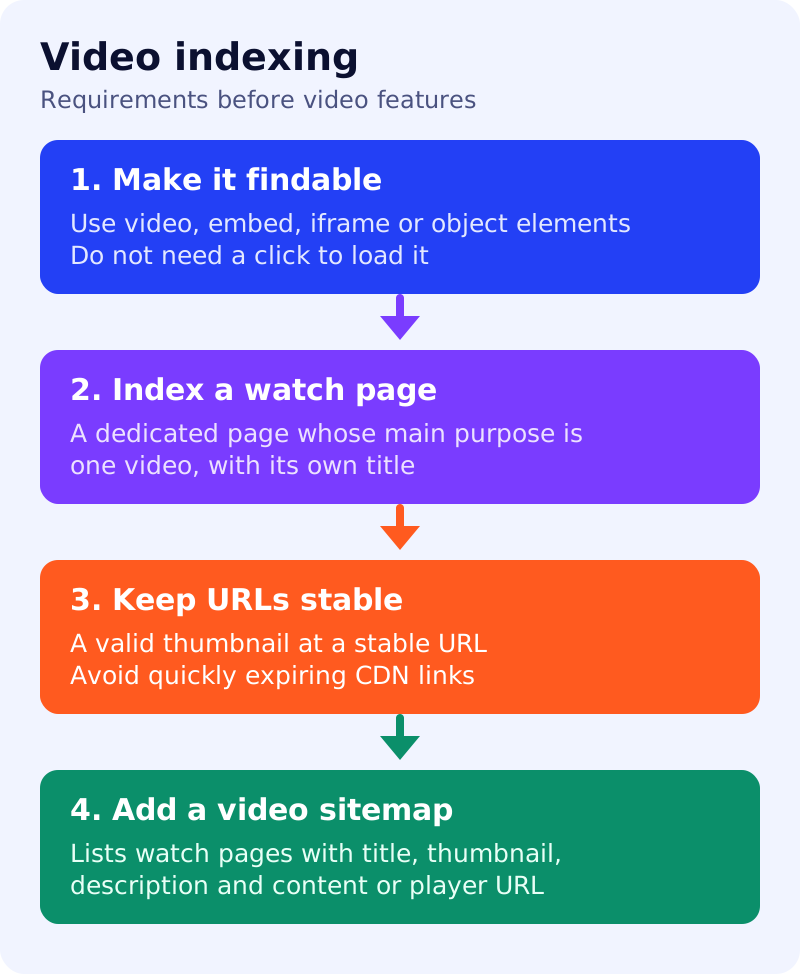
What Google says
- Videos can appear on the main results page, in Video mode, Google Images and Discover.
- Findability. Google can find videos referenced by
video,embed,iframeorobjectelements. Do not use URL fragments to load the video. If JavaScript injects the video, it must appear in the rendered HTML in URL Inspection. If you use a media API, still inject the video container even if the API call fails. Do not rely on a swipe, click or typing to load it. - Metadata helps. Google supports structured data, video sitemaps and the Open Graph protocol.
- Indexing requirements. The watch page must be indexed, and an indexed watch page must be performing well in Search before its video can be considered for indexing. A video must be embedded on a watch page, not hidden behind other elements, and have a valid thumbnail at a stable URL. Paywalled videos need paywall structured data.
- File types include MP4, WebM, MOV, MKV, AVI and several others listed on the page. Data URLs are not supported.
- Stable URLs. If a CDN rotates thumbnail URLs too often, Google may not index the video. For key moments and video previews, video files should also sit at stable URLs. Google notes you can verify Googlebot before serving the
contentUrlto protect files. - Dedicated watch pages. For video results, key moments, the LIVE badge and other formats, give each video its own watch page where it makes sense. A page whose main purpose is one video is a watch page. A blog post reviewing a video, a product page with a 360 video, or a category page listing many videos is not. Give each watch page a unique title and description.
- A video can also appear on a non-watch page, which may still show as a text or image result with a video badge.
- If you embed videos from YouTube, Vimeo or Facebook, Google may index the video both on your page and on the platform’s page. Check that your host lets Google fetch the file for more features.
- Video sitemaps are recommended. A video entry uses tags such as
video:thumbnail_loc,video:title,video:descriptionandvideo:content_locorvideo:player_loc. Thelocis the watch page URL.
What to do: step by step
| Step | Owner | Time | How to check | Done when |
|---|---|---|---|---|
| 1. List your videos and their pages | Video, SEO | 1 hour | One row per video with its watch page | A register exists |
| 2. Check embeds | Developer | 1 hour | URL Inspection rendered HTML shows the player | Every embed visible without a click |
| 3. Check watch pages | SEO | 1 hour | One video per page, unique title and description | No duplicated titles |
| 4. Fix thumbnails | Developer | 1 hour | Stable URL, no expiring token | Same URL on repeated loads |
| 5. Build a video sitemap | Developer | 2 hours | Watch page URL, thumbnail, title, description, content or player URL | Sitemap validates and is submitted |
| 6. Monitor in Search Console | SEO | 30 min monthly | Google lists Search Console among the ways to monitor videos | Issues tracked and closed |
Common mistakes
- Putting the only video on a page that is mainly an article and expecting video results.
- Expiring CDN thumbnails.
- A play button that loads the player only after a click.
- Listing unrelated videos in a sitemap entry for a page.
Related: XML sitemaps, JavaScript SEO check and paywalled content. Results are not guaranteed.