

A status code is the first thing a crawler learns about a URL, and often the only thing it needs. Google’s page (last updated 4 February 2026 as we read it) covers the top 20 status codes it meets. This post condenses it into a table and a weekly routine.
Best for: SEO leads, developers and site reliability teams.
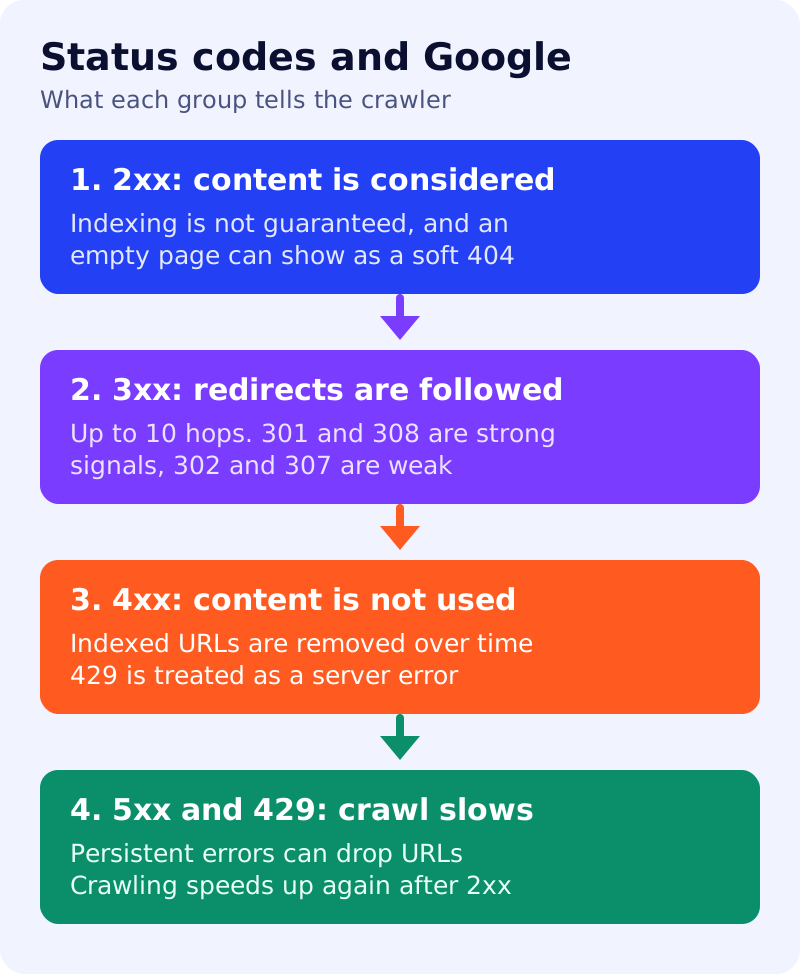
What Google says
- 2xx. Content may be considered for processing, such as indexing, but a 2xx does not guarantee indexing. If the content looks like an error or an empty page, Search Console shows a soft 404.
204means no content, so there is nothing to process. - 3xx. Google’s crawlers follow up to 10 redirect hops by default. Content from the redirecting URL is ignored and the target’s content is processed.
301and308are strong signals that the target should be processed.302and307are weak signals. Google treats the pairs the same but advises using the semantically correct code so other clients benefit. - 304. Signals that the content is the same as last time. It has no effect on indexing otherwise.
- 4xx. Google does not use content from 4xx URLs. It does not index them, and URLs already indexed are removed. All 4xx except
429are treated the same way: newly encountered 404 pages are not processed, and crawling frequency gradually decreases. Do not use401or403to limit crawl rate, because 4xx codes except 429 have no effect on it. - 429 and 5xx. Both prompt crawlers to slow down temporarily.
429is treated as a server error. For Search, already indexed URLs are kept for a time but eventually dropped, and URLs that persistently return a server error are removed. Once the server returns 2xx again, Google gradually increases the crawl rate.
Reference table (our summary)
| You see | Google does | You should |
|---|---|---|
| 200 with a thin “not found” page | May report a soft 404 | Return a real 404 or 410 |
| 301 or 308 | Treats target as the page to process | Use for permanent moves |
| 302 or 307 | Follows, but a weak signal | Use only for temporary moves |
| Redirect chain over 10 hops | May stop following | Collapse to one hop |
| 404 or 410 | Stops using the URL over time | Fine for removed content |
| 403 used to slow the crawler | No crawl-rate effect | Use 429 or 503 temporarily instead |
| 500, 502, 503 | Slows crawling, drops persistent errors | Fix quickly, and keep outages short |
What to do: weekly triage
| Step | Owner | Time | How to check | Done when |
|---|---|---|---|---|
| 1. Export crawl or log status counts | Developer | 30 min | Group by code for Googlebot requests | A table of counts per code |
| 2. Find soft 404 candidates | SEO | 30 min | Search Console soft 404 report and 200 pages with error text | A list of pages to fix |
| 3. Shorten redirect chains | Developer | 1 hour | Crawl for hops above one | No chain over two hops |
| 4. Check 5xx and 429 spikes | Developer, ops | 30 min | Server logs by hour | Cause and fix noted |
| 5. Confirm key pages return 200 | SEO | 20 min | Ten priority URLs, headers checked | All 200 without redirects |
| 6. Record changes | SEO | 10 min | Dated note | A running log exists |
Common mistakes
- Serving “page not found” text with a 200.
- Using 403 or 401 as a crawl throttle.
- Leaving a site on 503 for days during maintenance.
- Using a temporary redirect for a permanent move.
Related: which redirect to use, 5xx errors and robots.txt, server logs method and how to remove a page. This post covers status codes only. Results are not guaranteed.