

For years, mobile apps have trained people to follow a fixed route. Open the app, find the right screen, tap a menu, enter information and submit.
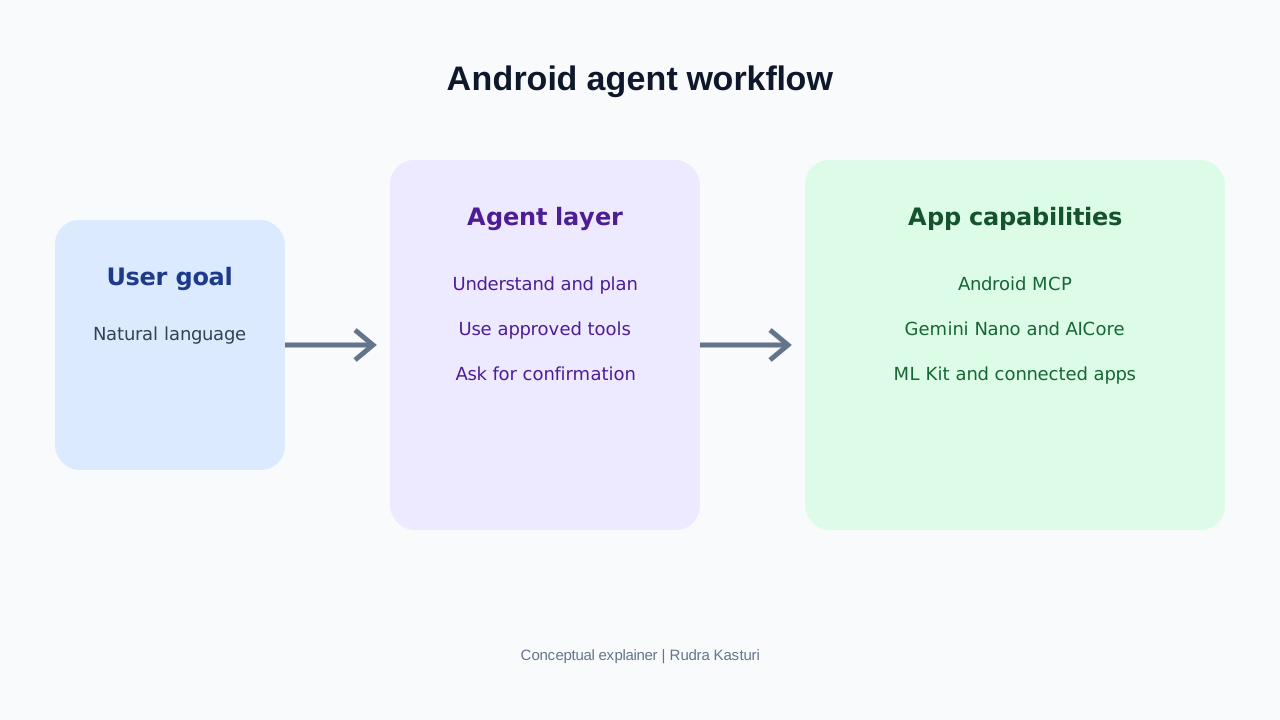
Google’s Android Developer Summit update on 5 November 2026 describes a different direction. People may increasingly tell an assistant what they want to accomplish, while AI agents coordinate the steps across apps and services.
For example, instead of opening a calendar, messaging app and travel app separately, a user might ask an assistant to organise a business trip. The assistant could help check the calendar, find travel options and prepare messages. Each service still needs to expose the right capabilities and protect the user’s data.
Google highlighted Android MCP, Gemini Nano, AICore, ML Kit and Connected Apps as part of the intelligent-app developer story.
1. What is changing for an ordinary Android user?
Consider a simple task: “Help me prepare for tomorrow’s client meeting.”
Today, the user may:
- Open Calendar to check the meeting time.
- Open Maps to check travel time.
- Open Gmail to find the latest email.
- Open Notes to review preparation points.
- Open a messaging app to tell a colleague when they will arrive.
An agent-led experience could understand the goal, identify which connected services can help and prepare a combined view of the information.
The user could review the plan and approve any action that sends a message, changes a calendar event or shares personal information.
The change is from navigating applications one by one to expressing an outcome and letting an assistant coordinate permitted steps.
This is a direction for developers to build toward. It does not mean all Android apps currently support these workflows.
2. What are the technologies Google is talking about?
Android MCP
MCP stands for Model Context Protocol. It provides a structured way for AI systems to discover and use tools exposed by other applications or services.
In practical terms, an app could expose a defined capability such as checking order status, searching available appointments or retrieving a user’s saved preferences. An agent can use the capability through an agreed interface rather than trying to imitate taps on a screen.
The app developer must decide which tools are exposed, what information they return and which actions require confirmation.
Gemini Nano
Gemini Nano is Google’s family of smaller AI models designed for on-device use on supported devices.
Running some AI tasks on the phone can reduce the need to send every piece of information to a remote server. It may also improve response time or allow certain features to work with limited connectivity.
There are trade-offs. On-device models have limits in capability, memory, device compatibility and processing resources. A complex task may still need a cloud model or a conventional backend.
AICore
AICore is part of Android’s system-level support for on-device AI features and model delivery on supported devices. Developers should use the current Android documentation to understand supported APIs, model availability and device requirements.
It is not a guarantee that every Android phone has the same model or capabilities.
ML Kit
ML Kit gives developers ready-to-use machine learning capabilities for mobile applications. Depending on the feature, it can support tasks such as text recognition, image labelling and other on-device or integrated ML use cases.
It complements generative AI. Not every app problem needs a large language model.
Connected Apps Platform
Google’s Connected Apps direction is about enabling assistants and apps to work together. The important product question is how a user’s intent can be translated into a set of permitted actions across services.
The value depends on which apps participate, what permissions users grant and how reliably each app completes its part.
3. How is this different from traditional app automation?
Traditional automation often follows a fixed sequence. If a screen changes or a step fails, the workflow can break.
An agent-led workflow starts with a goal and may choose between available tools based on the context. It can ask a follow-up question when information is missing.
| Traditional app experience | Agent-enabled experience |
|---|---|
| User finds each feature manually | User describes the intended outcome |
| User moves between apps | Agent can coordinate connected capabilities |
| Fixed sequence of screens | Workflow can adapt to available information |
| User remembers what to do next | Agent can prepare the next step |
| Permissions are managed inside each app | Permissions still matter, with additional care needed when actions cross apps |
The agent should not become a hidden operator with unlimited access. The user needs to know what information is being used and which actions will happen.
4. What could this mean for Indian app businesses?
Banking and payments
A user could ask, “Show my spending this month and help me set a travel budget.” An assistant might retrieve permitted transaction summaries and present a budget view.
A money transfer, investment or payment must remain behind clear authentication and confirmation. An agent should never be able to silently move money simply because it can understand a request.
E-commerce
A shopper could ask for a replacement charger compatible with a specific phone. An app could expose product search, compatibility details, delivery estimates and order status as separate capabilities.
The assistant helps discover and compare. The commerce platform remains responsible for accurate inventory, pricing, returns and payment.
Mobility and travel
A user could ask for a route to the airport, check a booking and prepare a reminder. The workflow may use maps, calendar and travel services, but each provider must expose reliable data and actions.
Healthcare
An app could help a patient find an appointment, retrieve preparation instructions or organise a list of questions for a doctor. Clinical interpretation and treatment decisions must remain with qualified professionals.
Regional language services
India’s language diversity creates an important opportunity. People may describe a task in Telugu, Hindi, Tamil or a mix of languages. An assistant could become a simpler entry point to services, provided the app supports the language, local terminology and appropriate consent.
5. What should an app company build first?
Do not rebuild the entire app around agents. Start with tasks that users already perform frequently.
A useful first shortlist:
- Check an order or service request.
- Find an appointment or available slot.
- Retrieve a statement or status.
- Search a product catalogue using several conditions.
- Prepare a support request.
- Summarise information the user is authorised to access.
For each task, define the tool name, required inputs, output fields, user permissions, failure response and whether confirmation is required.
Separate read-only capabilities from actions that change data, create a booking or spend money.
6. The product and security questions teams must answer
An app that is accessible to an agent needs clear boundaries.
Identity: How does the service know which user is making the request?
Permission: Can the agent access only the information the user has authorised?
Confirmation: Which actions require the user to approve before execution?
Data minimisation: Does the tool return only the fields needed for the task?
Audit: Can the business see what was requested, what data was accessed and what action was taken?
Failure handling: What happens if the agent misunderstands the request or a connected service is unavailable?
Fallback: Can the user complete the task through the normal app interface?
These are not optional details. An agent that saves 30 seconds but exposes private information or makes an unauthorised booking is a failed product.
7. A 30-day roadmap for an Android app team
Week 1: Identify user friction. Use support tickets, analytics and user interviews to find the three most repeated multi-step tasks.
Week 2: Design safe capabilities. Choose one read-only workflow first. Define inputs, outputs, authentication and error handling.
Week 3: Build a limited prototype. Test with internal users and non-sensitive data. Confirm device compatibility for on-device capabilities.
Week 4: Measure the experience. Compare task completion time, success rate, number of app screens visited, failure rate, user corrections and permission denials.
A useful pilot score can assign 25 points to successful task completion, 20 to time saved, 20 to user satisfaction, 20 to safety and permission handling, and 15 to reliability. This is a proposed product metric, not a Google score.
8. What should developers not assume?
- Android MCP does not make every installed app agent-ready.
- Gemini Nano is not available with identical capability on every device.
- On-device AI does not automatically make every workflow private or secure.
- An agent should not bypass the app’s authentication or business rules.
- A natural-language request is not sufficient approval for every consequential action.
- App Store or Play Store policy, data protection and user consent obligations still apply.
Our reading
The mobile app is not disappearing. But the way people reach its services may change.
Today, many apps compete for attention by getting users to open them and navigate through screens. In an agent-enabled world, an app may also need to make its useful capabilities available to assistants in a safe, structured way.
For Indian app businesses, the sensible first move is not a large AI transformation programme. It is to identify two high-frequency user tasks, expose them with clear permissions, test whether the experience is genuinely easier and expand only when the numbers justify it.
The winning app will not necessarily be the one with the most AI features. It will be the one that helps the user finish the job with less effort and without losing control.