
Most AI assistants still communicate in one dominant format: text. Ask an assistant to compare three insurance plans and it may return a long explanation. Ask it to help reschedule a meeting and it may give you a sequence of instructions.
But people do not always need another paragraph. They need a screen where they can compare options, change a date, select a plan, review a chart or approve an action.
Google’s A2UI 1.0 is designed to help developers build that next step. Announced on 11 November 2026, it is an open protocol that allows an AI agent to describe an interactive interface. The application then renders that interface using its own registered components.
In simple language, the AI decides what kind of screen would help. The app decides which building blocks are allowed and how they appear.
1. Why do AI agents need a user interface?
Imagine asking an AI assistant to compare three health insurance policies for your family.
A text-only assistant might produce 20 paragraphs covering premiums, room rent limits, waiting periods, exclusions and claim processes. You then have to remember the differences and ask follow-up questions.
A more useful experience could show:
- Three plans side by side.
- Premium and cover amount.
- Waiting periods and important exclusions.
- A filter for your priorities.
- A button to inspect the original policy wording.
- A final confirmation before taking the next step.
The user can see the decision, change the inputs and understand what happens next.
The same problem appears in travel bookings, expense approvals, customer support, enterprise reporting and education. Text is excellent for explaining. It is not always the best interface for completing a task.
2. What is A2UI?
A2UI stands for Agent-to-User Interface. It is a protocol for describing user interfaces that an application can render.
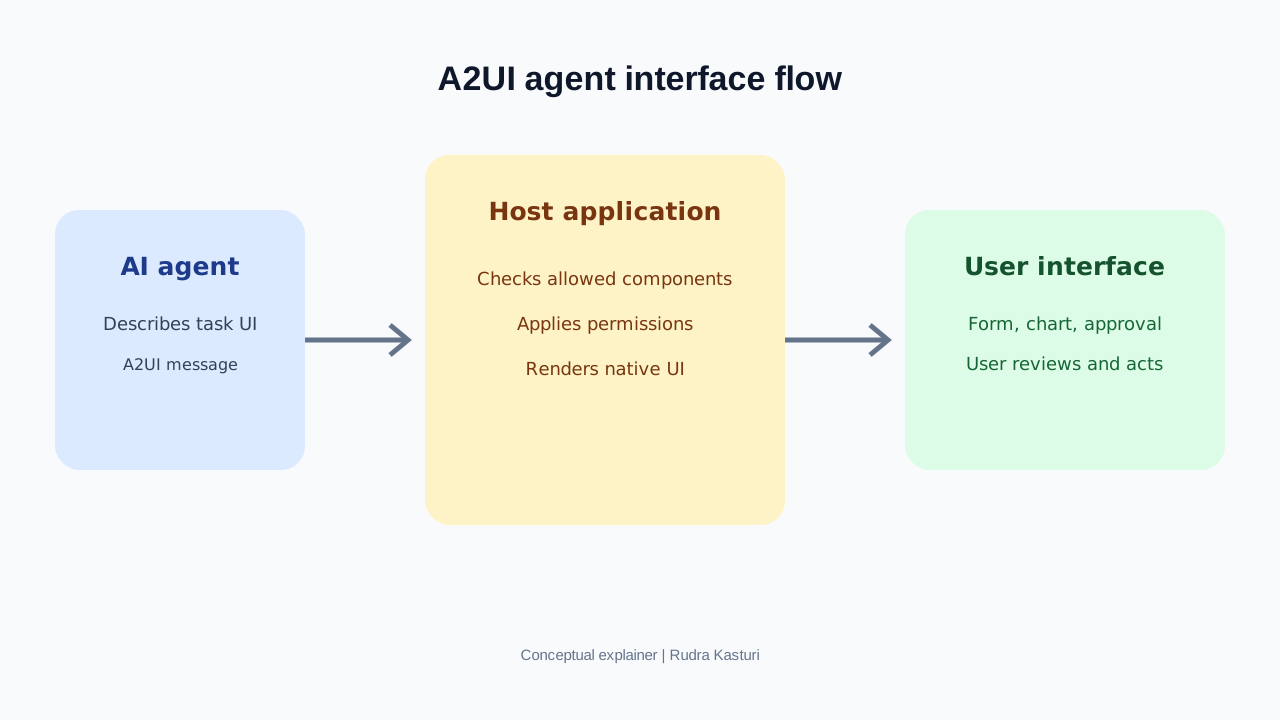
The important design choice is that the AI agent does not send arbitrary executable interface code and take over the app. Instead, it describes a screen using structured messages. The host application maps those descriptions to components that the application has registered and controls.
For example, a travel app may allow an agent to request:
- A destination card.
- A date selector.
- A hotel comparison list.
- A price summary.
- A booking confirmation component.
The app controls how those components look, what data they can access and which actions they can perform.
This gives the business more control over its brand, security and user experience than allowing an AI model to invent an unrestricted screen.
3. How does an A2UI experience work?
A typical interaction has six stages.
- The user describes a goal. For example, “Find a flight from Bengaluru to Delhi next Friday morning, with one checked bag.”
- The agent works out what is needed. It identifies the information and actions required to fulfil the request.
- The agent describes the interface. It sends structured A2UI messages describing the relevant fields, cards or controls.
- The host app validates the request. It checks whether the requested components are allowed and whether the data and actions are permitted.
- The app renders the interface. It uses its own native design system and components.
- The user reviews and acts. The user changes the date, selects a flight and confirms before a booking or payment.
The protocol describes the interface and interaction. The agent, application, APIs and business rules still need to do the actual work.
4. What changed with A2UI 1.0?
Google describes version 1.0 as the first stable version. Its announcement highlights a number of capabilities:
A stable protocol with two-way interactions. A2UI 1.0 adds bidirectional function calls. This matters when an interface needs to do more than display information. A flight or reservation picker, for example, may need to check availability while the user is interacting with it.
Accessibility and extensions. The release adds accessibility support and extension points for additional metadata. Developers still need to test the actual experience with assistive technologies.
Renderer options. Google lists open-source renderers for web technologies including React, Angular and Lit, Flutter across mobile, web and desktop, and SwiftUI on iOS. Jetpack Compose support for Android is at version 0.9.1, with 1.0 support described as coming soon.
Agent SDKs. Google announced SDKs for Python, TypeScript and Dart to help developers integrate A2UI with agent systems.
MCP Apps compatibility. Web and Flutter renderers can work inside MCP Apps, allowing A2UI experiences to appear in compatible assistants.
Check the current project documentation before selecting a production stack because SDK maturity and platform support can change.
5. A2UI and MCP: are they the same thing?
No. They solve related but different problems.
Model Context Protocol, or MCP, provides a standard way for AI applications to connect with tools and data sources. MCP Apps allow compatible assistants to host interactive application experiences.
A2UI focuses on how an agent describes an interface that a host can render.
Think of a travel assistant:
- MCP can help the assistant access a travel service’s search or booking tools.
- A2UI can describe the screen showing available flights, filters and a confirmation step.
- The travel application controls the components, data access and final booking action.
They can work together. A2UI does not replace MCP, and MCP alone does not define the visual interface in the same way.
6. What could businesses build with it?
Banking and financial services
An assistant could explain a spending pattern and display a category-wise chart, budget controls and a savings goal. A transfer or investment action should require explicit review and confirmation.
E-commerce
A shopping assistant could show a comparison of products, sizes, delivery estimates and return policies. The user can change filters and select a product without reading a long chat response.
Travel
A travel assistant could combine dates, transport, hotel options and activities into one itinerary view. The user could edit the plan before moving to booking.
Healthcare administration
A hospital assistant could present appointment choices, pre-visit instructions and a form to update details. It should not turn an interface into an unsupported diagnosis or bypass clinical review.
Enterprise operations
A manager could ask for a weekly performance summary and receive charts, a list of exceptions and approval cards. The manager can inspect the underlying numbers before approving action.
7. What does A2UI not do?
It is important not to overstate the announcement.
- A2UI does not create a complete AI agent for a business.
- It does not automatically connect an app to every company database.
- It does not guarantee that the agent’s answer is correct.
- It does not make a requested action safe simply because it appears in a native screen.
- It does not remove the need for authentication, permissions, audit logs and confirmation.
- It does not mean every assistant or app supports A2UI 1.0 today.
A well-designed interface can still present incorrect information. The data and business logic behind it must be trustworthy.
8. What should a product team evaluate before adopting A2UI?
Start with a task where a screen clearly improves the experience.
Ask:
- Is the task difficult to complete through text alone?
- Which components should the agent be allowed to request?
- Which information can be shown to the model, and which should remain inside the application?
- Which actions are read-only and which change data, spend money or create obligations?
- Where is explicit user confirmation required?
- Can the user inspect the source data behind a chart or recommendation?
- Does the interface work on mobile, keyboard navigation and assistive technology?
- Is there a fallback if the agent or renderer fails?
A useful first pilot could be a support case summary with an editable response form, or an internal report with charts and approval controls. Avoid starting with payments or high-impact decisions.
9. A practical 30-day pilot
Week 1: Select one workflow. Interview users and identify where text-based AI currently creates unnecessary back-and-forth.
Week 2: Map the interface. Define the components, data sources, permissions, error states and confirmation steps.
Week 3: Build a controlled prototype. Use a limited set of registered components and test with realistic but non-sensitive data.
Week 4: Test with users. Compare task completion time, error rate, number of clarification messages, abandonment and user understanding against the existing chat experience.
A proposed pilot score can assign 25 points to task completion, 25 to accuracy, 20 to user effort, 20 to safety and permission handling, and 10 to accessibility. This is an internal evaluation framework, not a Google benchmark.
Our reading
A2UI matters because it recognises a limitation in conversational AI. People do not want to chat forever when they are trying to finish a job.
The next generation of useful assistants will need to explain, retrieve information, use tools and present the right interface at the right moment. A2UI gives developers one building block for that experience.
The opportunity is not to replace every app screen with AI. It is to let people reach the right screen through a more natural request, while the application remains responsible for trust, data and control.