

Shoppers and shopping systems ask the same questions: how much does shipping cost and when will it arrive? Google’s shipping policy documentation (last updated 8 September 2026 as we read it) explains how to answer them in markup, once for the business and again where a product is different.
Best for: ecommerce managers, merchandisers and developers.
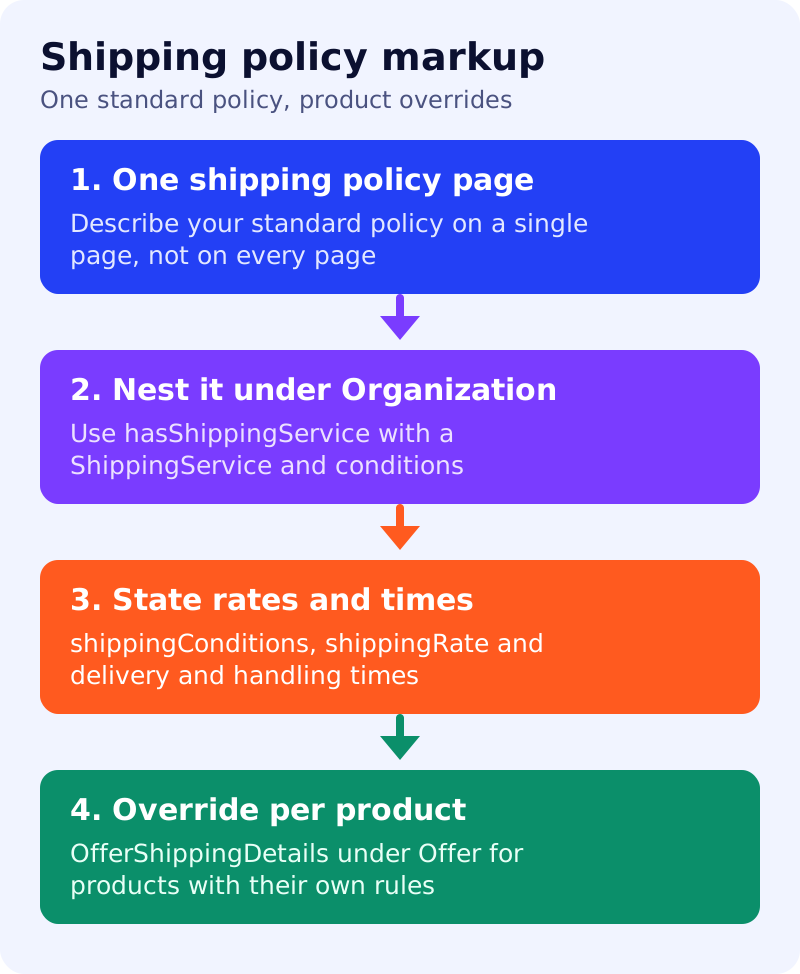
What Google says
- When you add
ShippingServicestructured data, Google Search can use it to display shipping information alongside your products and in knowledge panels. - It lets you specify shipping costs and delivery times that depend on product characteristics such as weight or dimensions, or on delivery location.
- A standard policy for most or all products goes in
ShippingService, nested underOrganizationwith thehasShippingServiceproperty. Google recommends putting it on a single page that describes your shipping policy, not on every page. - For a non-standard policy on a specific product, use
OfferShippingDetailsunderOfferwith theshippingDetailsproperty. The properties supported at offer level are a subset of those at organisation level. See Google’s merchant listing documentation for that subset. shippingConditionsis required. It specifies the shipping cost and delivery times that apply for a set of conditions, such as a weight range, order value or destination. Other properties includename,description,fulfillmentType(delivery to an address, or to a collection point),handlingTimeandvalidForMemberTierfor loyalty tiers.- Within conditions, recommended properties include
shippingDestination,shippingRateanddoesNotShip. - Google’s example describes free two-day shipping over a price threshold in some countries and no shipping below a threshold elsewhere, which shows that one policy can hold several conditions.
What to do: step by step
| Step | Owner | Time | How to check | Done when |
|---|---|---|---|---|
| 1. Write the policy in plain text | Operations | 2 hours | Destinations, thresholds, rates, handling and delivery times | One approved page |
| 2. Publish one shipping page | Content | 1 hour | A single URL linked from the footer | Page live and crawlable |
| 3. Model the conditions | Developer | 2 hours | One ShippingService per policy, one condition per row | Each rule in the text has a condition |
| 4. Nest under Organization | Developer | 1 hour | hasShippingService on your organisation markup | Validates with no errors |
| 5. Add product overrides | Developer | 2 hours | OfferShippingDetails for exceptions only | Each exception has a reason |
| 6. Match markup to the page | Merchandiser | 30 min | Compare rates and times | No mismatch |
| 7. Review when rates change | Operations | Quarterly | Dated change note | Markup updated within a week |
A worked example (made-up)
A shop ships free in two days within India for orders above 1,999 rupees, otherwise charges 99 rupees and takes four days. It does not ship to two regions. It publishes one policy page, a ShippingService with three conditions and doesNotShip for the excluded regions, and an override for oversized furniture with its own rate and time.
Common mistakes
- Putting a different policy in markup from the one the page states.
- Repeating the full policy on every product page instead of using offer-level overrides for exceptions.
- Leaving old delivery times after a courier change.
- Forgetting that offer-level details support fewer properties.
Related: product data for AI shopping, organization markup and sameAs and Google’s universal cart. Display of shipping information is not guaranteed.