

Research and government sites publish data that other people want to cite and reuse. Google’s dataset documentation (last updated 8 September 2026 as we read it) describes how to make those datasets discoverable.
Best for: research institutions, public bodies, data journalism teams and companies that publish open data.
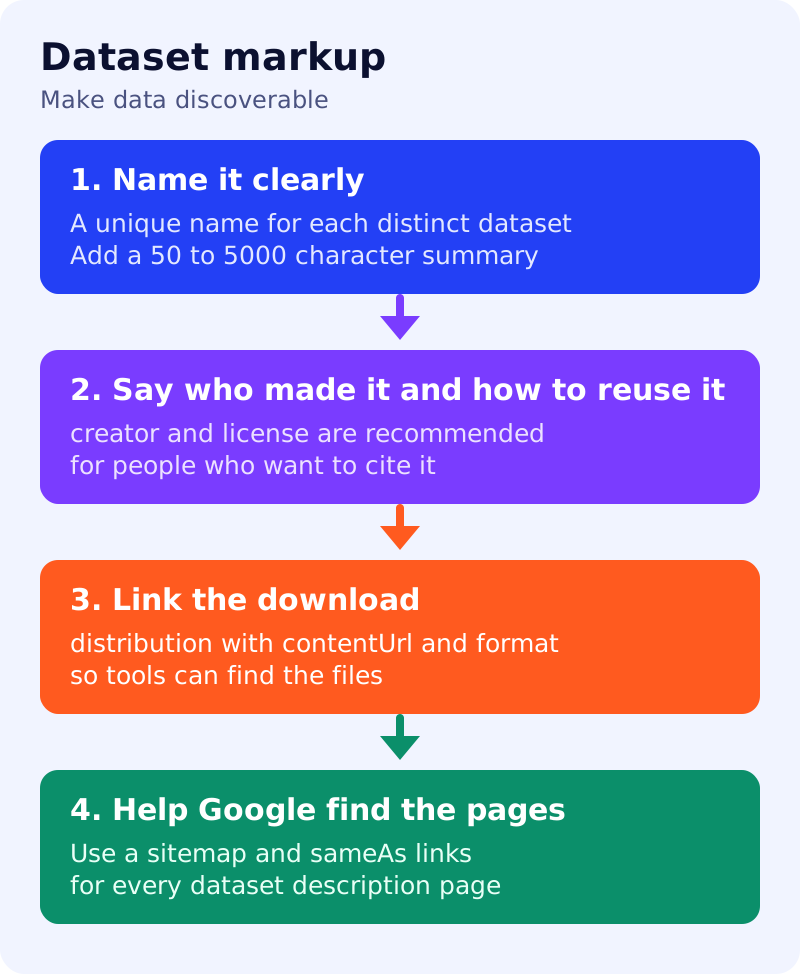
What Google says
- Datasets are easier to find in Dataset Search when you supply information such as name, description, creator and distribution formats as structured data. The aim is to improve discovery of datasets from fields such as life sciences and social sciences.
- Google understands schema.org
Datasetmarkup, with JSON-LD in schema.org syntax preferred. It also has experimental support for W3C CSVW. - Required:
name(a descriptive name; use unique names for distinct datasets whenever possible) anddescription(a short summary of 50 to 5000 characters, which may include Markdown, with absolute URLs for embedded images). - Recommended properties include
creator,license,identifier,isAccessibleForFree,keywords,sameAs,temporalCoverage,spatialCoverage,variableMeasured,urlanddistribution. Fordistribution(DataDownload),contentUrlis required and the file format is described. - Use a sitemap, and
sameAsmarkup, to document how dataset descriptions are published across your site, and follow Google’s source and provenance practices. - To keep a dataset out of Dataset Search, use the robots meta tag. Changes may take days or weeks to appear.
- Google’s example describes a collection of files that together form a meaningful dataset, and uses sub-datasets for parts.
What to do: step by step
| Step | Owner | Time | How to check | Done when |
|---|---|---|---|---|
| 1. Inventory datasets | Data steward | 2 hours | One row per dataset with a landing page URL | A register exists |
| 2. Write unique names | Data steward | 1 hour | Sort names and look for duplicates | No two datasets share a name |
| 3. Write the descriptions | Researcher | 3 hours | 50 to 5000 characters each | All descriptions meet the length |
| 4. Add creator and license | Legal, data steward | 1 hour | A license URL per dataset | No missing license |
| 5. Add distribution | Developer | 2 hours | Each download has a contentUrl and format | Links work |
| 6. Add coverage and variables | Researcher | 2 hours | Time span, place and measured variables | Optional fields filled where known |
| 7. Publish a sitemap and validate | Developer, SEO | 1 hour | Sitemap lists landing pages; Rich Results Test passes | Samples validate |
Common mistakes
- Giving different datasets the same name.
- A description that is a title in disguise, under 50 characters.
- Linking to a page rather than the file in
contentUrl. - Leaving out the license, which leaves reuse unclear.
- Marking up pages that are not about a dataset.
Related: the schema decision table, XML sitemaps and organization markup. Dataset Search visibility is not guaranteed.