

Teams often ask how to “win” featured snippets. Google’s page (last updated 10 December 2025 as we read it) is blunt: you cannot mark a page for one. The controls it describes are for opting out, and each has a side effect worth knowing before you use it.
Best for: SEO leads, editors and legal teams deciding how much of a page Google may show.
What Google says
- Featured snippets are special boxes where the format of a regular result is reversed, with the descriptive snippet first. They can also appear within a related questions group, known as People Also Ask.
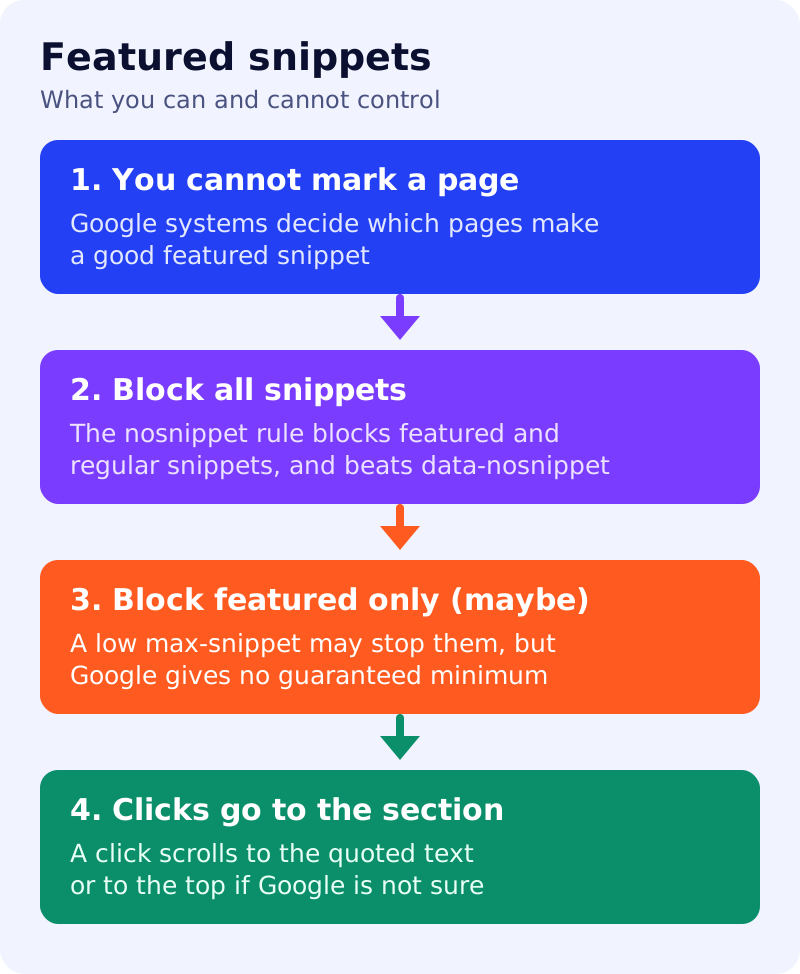
- You cannot mark your page as a featured snippet. Google’s systems decide whether a page would make a good one and, if so, elevate it.
- To block all snippets, featured and regular, add the
nosnippetrule. Text marked withdata-nosnippetstays out of both kinds of snippet. If a page has both rules,nosnippettakes priority. - To keep regular snippets but try to avoid featured ones, experiment with lowering
max-snippet. Featured snippets appear only if enough text can be shown to make a useful one. Google gives no exact minimum, because it varies with the information, the language and the platform. - A low
max-snippetdoes not guarantee that featured snippets stop. For a guarantee, usenosnippet. - A click on a featured snippet takes the user to the quoted section of the page automatically, with no extra annotation from you. If the browser cannot do that or Google is not confident where the section is, the click goes to the top of the page.
- Google’s robots documentation says
nosnippetapplies across results including AI Overviews and AI Mode and also prevents the content from being used as a direct input for them.max-snippetsimilarly limits how much may be used as direct input there.
Our view: choose on purpose
| Goal | Option | What it costs |
|---|---|---|
| Never appear in any snippet | nosnippet | Also limits AI Overviews and AI Mode use |
| Hide only a section, such as a paid answer | data-nosnippet on that element | The rest stays eligible |
| Fewer featured snippets, regular kept | Lower max-snippet in steps | No guarantee, and it limits AI input too |
| Be eligible | Do nothing special | You cannot force a snippet |
What to do: step by step
| Step | Owner | Time | How to check | Done when |
|---|---|---|---|---|
| 1. Decide the policy | Leadership, SEO | 30 min | Which pages must never show a snippet? | A written list with reasons |
| 2. Find current featured snippets | SEO | 1 hour | Search your key questions and note which show your page | A table of query, page and format |
| 3. Pick the control per page | SEO | 30 min | Use the table above | One option chosen per page |
| 4. Apply it | Developer | 1 hour | Inspect the meta tag, header or attribute | The rule is in the live source |
| 5. Test one change at a time | SEO | 2 weeks | Re-check the same queries | You know whether the rule worked |
| 6. Review for AI side effects | SEO | 30 min | Does the page still need to be quoted by AI features? | A recorded decision |
Common mistakes
- Using
nosnippetonly to avoid featured snippets, then wondering why the page vanishes from AI answers. - Treating a low
max-snippetas a guaranteed fix. - Combining rules and assuming the lenient one wins. The more restrictive rule applies.
- Trying to “optimise for” a featured snippet with markup. Google says you cannot mark a page.
Related: snippets and meta descriptions, control what you share with Google and the AI features checklist. Results are not guaranteed.