

A carousel shows several cards from one site in a row you can swipe. Google’s documentation (last updated 8 September 2026 as we read it) explains how a site can be eligible, and it is stricter than many teams expect.
Best for: recipe, education, restaurant and movie sites with list pages.
What Google says
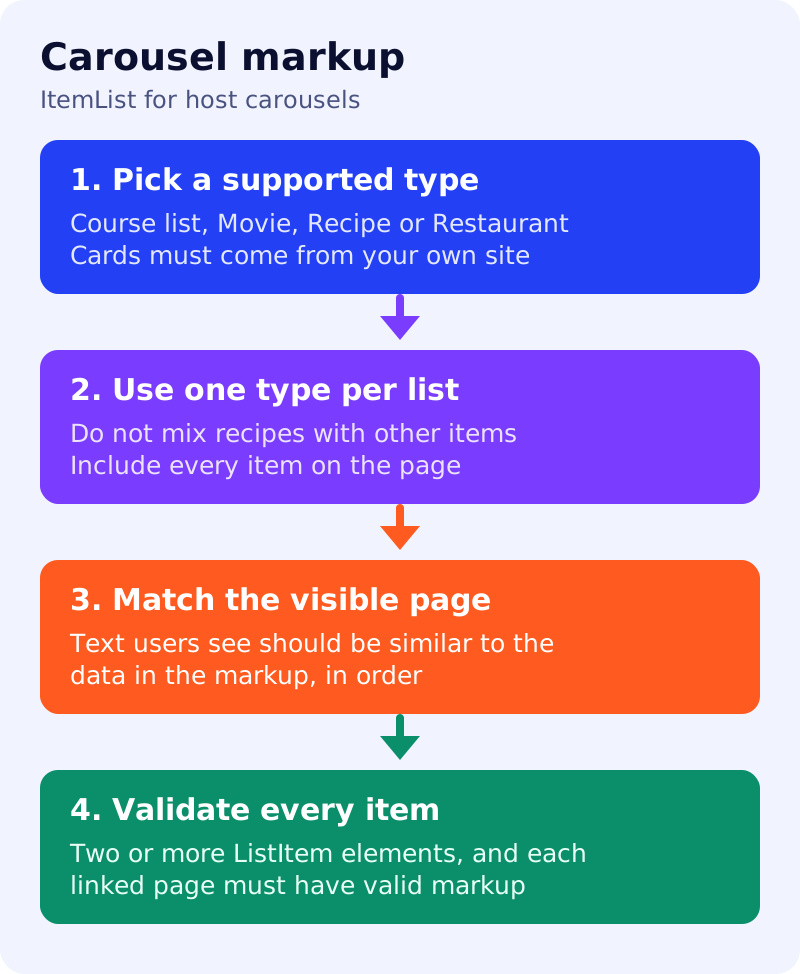
- A carousel is a list-like rich result people can swipe through on mobile. It displays multiple cards from the same site, known as a host carousel.
- Eligibility comes from
ItemListstructured data combined with one of four supported features: Course list, Movie, Recipe or Restaurant. - Other carousel-like features, such as Top stories, show results from different sites. You cannot control those with carousel markup.
- Choose where the markup lives. Option one is a summary page with a short description of each item, each pointing to its own detail page. Option two is a single all-in-one page that holds the list and the details together.
- All items in the list must be the same type. Do not mix recipes with other items.
- The markup must be complete and contain all the items listed on the page.
- Visible text must be similar to the information in the structured data.
- Items appear in the order given by the
positionproperty. - Validate in the Rich Results Test. For a summary page, also check that
itemListElementcontains two or moreListItemelements of the same type, and test each listed URL, because each page must have valid markup for its own type.
Decision guide (our summary)
| Your page | Use | Check |
|---|---|---|
| A list of ten recipes, each on its own page | Summary page with ItemList | Each recipe page has valid Recipe markup |
| A catalogue where everything lives on one page | All-in-one page | The list and each item’s data are both present |
| Mixed content, such as recipes and articles | Separate lists by type | No mixed list |
| A “best of” list from other websites | Not a host carousel | Cards must come from your own site |
What to do: step by step
| Step | Owner | Time | How to check | Done when |
|---|---|---|---|---|
| 1. Pick the list pages | SEO | 30 min | Which pages list recipes, courses, movies or restaurants? | A shortlist of pages |
| 2. Choose summary or all-in-one | SEO, developer | 30 min | Do the items have their own pages? | A pattern per page |
| 3. Validate each detail page | Developer | 2 hours | Rich Results Test on every linked page | Zero critical errors |
| 4. Add ItemList markup | Developer | 2 hours | Two or more items, same type, positions set | Validates |
| 5. Match visible text | Editor | 30 min | Names and order match what users see | No mismatch |
| 6. Re-check when lists change | Editor | Weekly | Items added or removed on the page and in markup | Both stay in sync |
Common mistakes
- Marking up five items while the page shows twelve.
- Linking to detail pages without valid markup.
- Mixing item types in one list.
- Expecting the markup to control Top stories.
Related: course page markup (which needs at least three courses for the course list feature), the schema decision table and structured data testing. Eligibility is not a guarantee of display.