

Stock runs out, a warehouse closes or an owner goes on leave, and someone suggests switching the site off. Google’s guide to pausing a business is clear that this is the wrong first move. This post turns it into a runbook for ecommerce and operations teams.
Best for: ecommerce managers, developers and SEO leads who face a temporary closure. Learners are welcome: each step names who does it and how to check it.
New to SEO or AEO? If a shop must stop selling for a while, the safe move is to keep the site online and switch off buying, not to take the site down.
SEO and AEO angle: Because a page must be indexed to be eligible for Google’s AI features (generative AI guide), keeping pages indexed during a pause keeps them eligible.
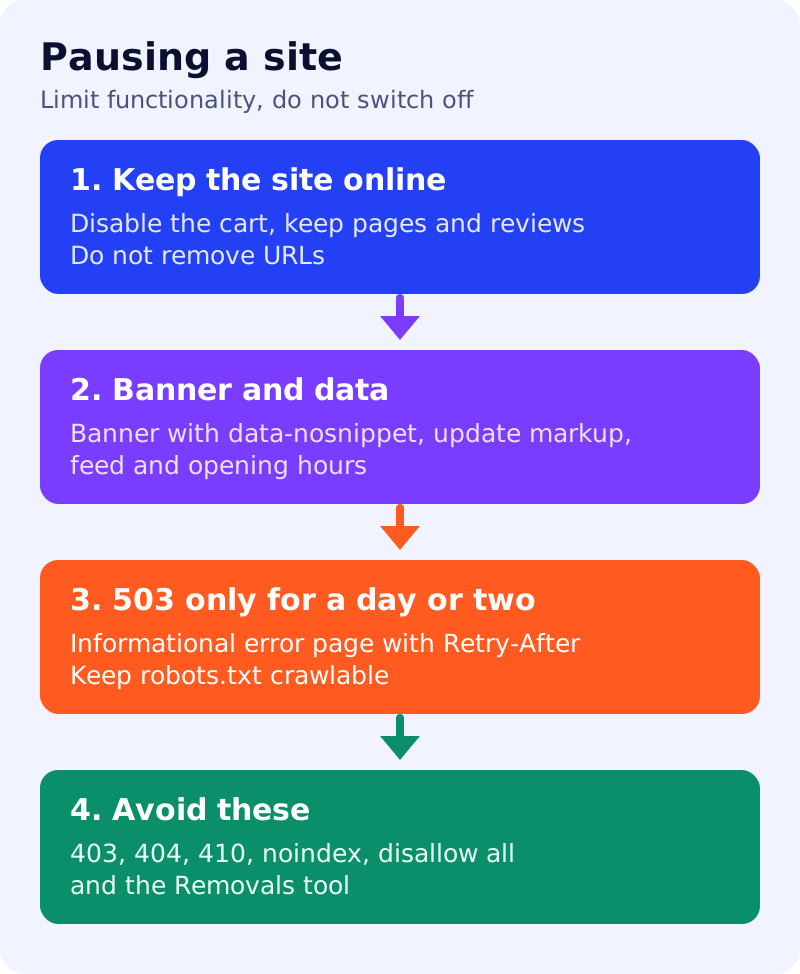
What Google says
- If the closure is temporary, keep the site online and limit functionality. This minimises negative effects on Search, and people can still find products, read reviews or add wishlists.
- Disabling the cart is the simplest approach and does not change visibility in Search. Add a banner or popup on all pages, including delays and shipping details, and use
data-nosnippetto keep its text out of snippets. Follow Google’s guidance on popups and banners. - Update structured data (Product, Book, Event) to reflect availability or cancelled events, update Local Business hours, check the Merchant Center availability attribute, and use Search Console for a few pages or sitemaps for many.
- Disabling the whole site is not recommended and should last only a few days at most. Recovery has no fixed time and no way to speed it up. Side effects include customers not finding you, knowledge panels losing information, and Search Console verification failing.
- If you must, for 1 to 2 days return an informational error page with a 503 status. For longer, provide an indexable placeholder home page with a 200.
- With a 503: keep robots.txt crawlable (do not return 503 for robots.txt), use a
Retry-Afterheader, keep the page light, and tell users what happens next. Pages returning 503 cannot have titles, descriptions or structured data refreshed. - Do not block the site with 403, 404 or 410, a noindex rule, a robots.txt that disallows everything, or the temporary removal tool. Do not block a whole region, since Google generally crawls from the US.
- For out-of-stock products, keep the page and mark it out of stock rather than using the Removals tool.
What to do: step by step
| Step | Owner | Time | How to check | Done when |
|---|---|---|---|---|
| 1. Decide the scope | Operations | 1 hour | Which products or services are paused | A written scope and end date |
| 2. Limit functionality | Developer | 2 hours | Cart disabled, pages still load | Pages stay online and indexable |
| 3. Add the banner | Designer | 1 hour | Banner on all pages, with the data-nosnippet attribute | Banner live, text not in snippets |
| 4. Update data | SEO | 2 hours | Product availability, event status, opening hours, feed | No page claims stock it lacks |
| 5. Tell Google | SEO | 30 min | Recrawl a few pages, or update the sitemap | Sitemap submitted |
| 6. Plan the reopening | Operations | 1 hour | Reverse every change, with a date | Reopening checklist ready |
Example (made up)
A shop closes for a month for stocktaking. It disables the cart, adds a banner with the reopening date, marks products out of stock in markup and the feed, and leaves every page live. Nobody switches the site off or removes URLs.
Common mistakes
- Returning 404 or 410 for a closure.
- Disallowing all crawling in robots.txt.
- Using the Removals tool for out-of-stock products.
- Forgetting to reverse the markup and banner after reopening.
Related: HTTP status codes and crawling, removing a page from Google and shipping policy markup. Results are not guaranteed.