When a stakeholder says “fix our snippet” or “why is the icon wrong”, it helps to use the same words Google uses. Google’s Visual Elements gallery names every part of a search result. This post turns it into an audit table, so each element has an owner and a page to learn from.
Best for: SEO leads, content teams and brand teams who review how pages look in Search. Learners are welcome: each step names who does it and how to check it.
New to SEO or AEO? A search result is made of parts, such as the site name, title link, snippet and extras. Knowing their names helps teams talk about fixes.
SEO and AEO angle: Google’s generative AI guide says a page must be indexed and eligible to show in Search with a snippet to appear in AI features, and those features show clickable links, so the same parts matter.
What Google says
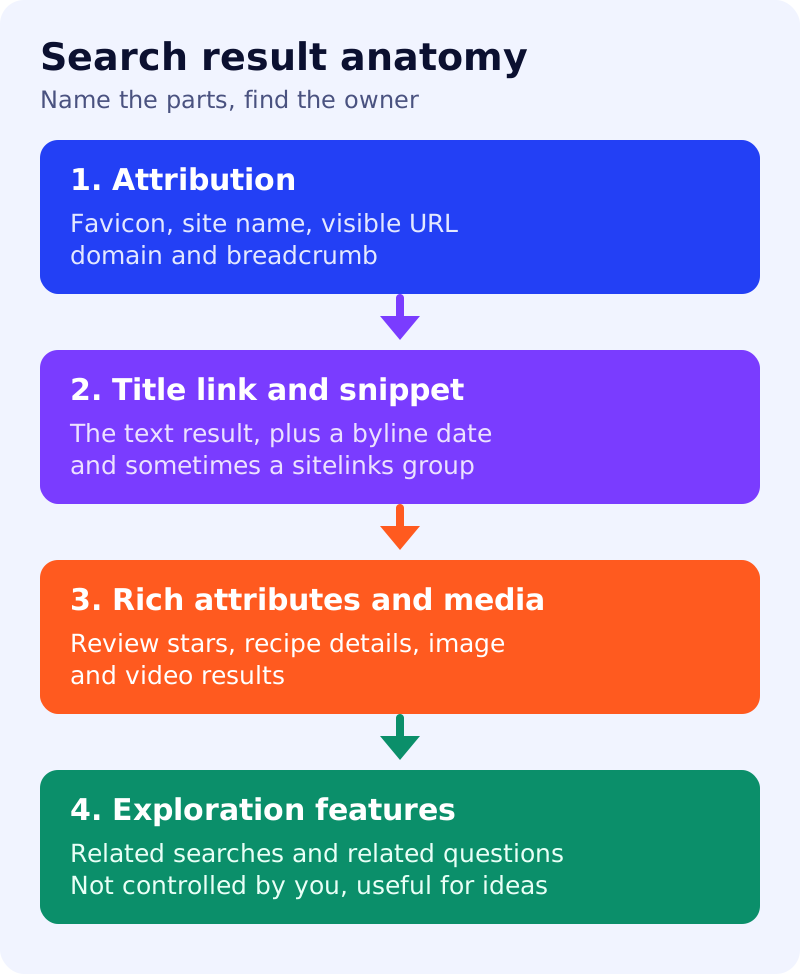
- Visual elements are the building blocks of the results page. The common types are text result, rich result, image result, video result and exploration features.
- Appearance can change over time and can differ by device, country, language of the query and other factors. Google adds that a text result will not show every possible element.
- Attribution describes the source and can include the favicon, site name, visible URL (domain and breadcrumb).
- A text result includes attribution, title link, snippet and sometimes a byline date, a text result image, rich attributes and a sitelinks group. Rich attributes, such as review stars and recipe information, are typically powered by structured data you provide. Sitelinks are automated, though Google offers best practices.
- Image results and video results are based on an image or video embedded on a page, and are more likely to appear for image-seeking or video-seeking queries.
- Exploration features include related searches and related questions (“People also ask”). Google says you cannot control what shows there, but they can suggest topics to write about. When a user expands a related question, a featured snippet is shown.
What to do: step by step
| Step | Owner | Time | How to check | Done when |
|---|---|---|---|---|
| 1. Search for your key pages | SEO | 30 min | Screenshots on desktop and mobile | A dated screenshot set |
| 2. Name each element | SEO | 30 min | Use Google’s names: favicon, site name, title link, snippet, byline date | Everyone uses the same words |
| 3. Match element to owner | SEO lead | 30 min | Favicon and site name to brand, title and snippet to content, dates to editors | An owner per element |
| 4. Fix what you control | Owners | 1 week | Title tags, meta descriptions, structured data and dates reviewed | Fixes logged |
| 5. Mine exploration features | Content | 1 hour | Related searches and questions noted as topic ideas | A list of ideas, not copied pages |
| 6. Re-check monthly | SEO | 30 min | New screenshots compared with old | Differences explained |
Example (made up)
A brand team complains that its icon looks wrong. The audit names it as the favicon, which belongs to the brand team, not the content team. The snippet issue goes to the editors. Both teams get a ticket with the right word and the right page to read.
Common mistakes
- Expecting every element to show for every result.
- Expecting identical results on desktop and mobile.
- Treating sitelinks as something you set directly.
- Writing separate pages for every related question only to chase rankings.
Related: how Google chooses your title link, favicons and site names, sitelinks and featured snippets. Results are not guaranteed.