

Newsletter pop-ups, app install prompts and consent screens all compete with the content a visitor came for. Google’s page on interstitials and dialogs explains why that matters for Search and what to do instead. This post turns it into an audit for marketing, design and SEO teams.
Best for: marketing managers, designers and developers who add overlays to pages. Learners are welcome: each step names who does it and how to check it.
New to SEO or AEO? An interstitial is a pop-up or overlay that covers a page, such as a newsletter box or an app prompt.
SEO and AEO angle: Google says intrusive overlays make it hard for Google and other search engines to understand content, and its generative AI guide asks for a good page experience.
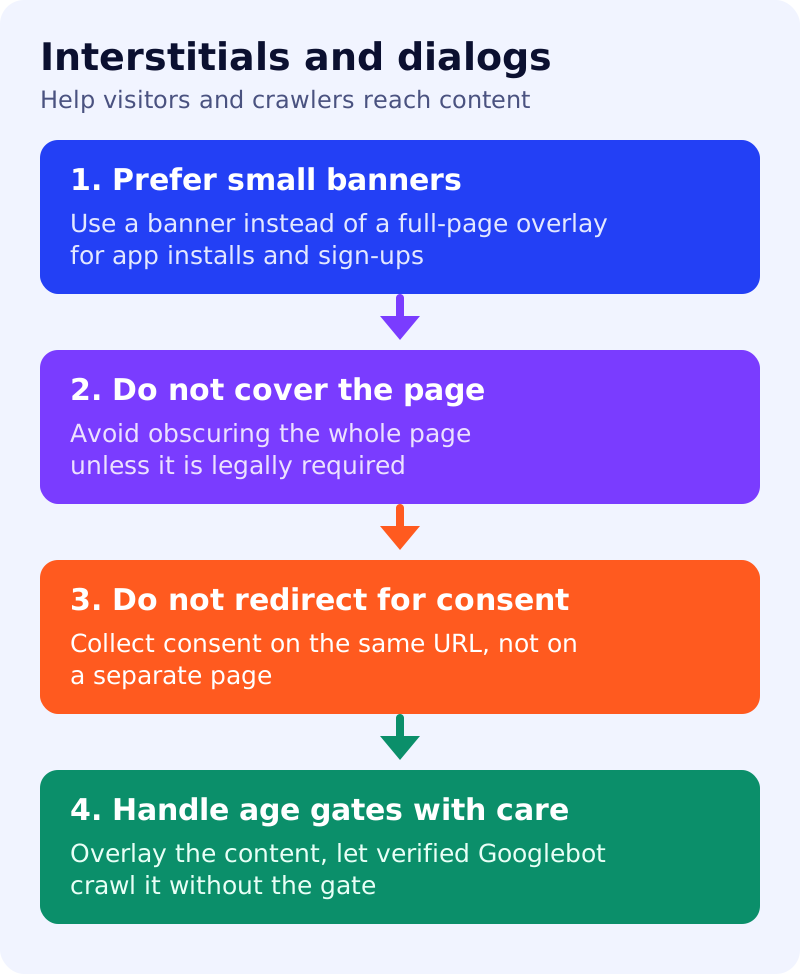
What Google says
- Interstitials are overlays on the whole page, and dialogs are overlays on part of it. Websites often need them, but intrusive ones frustrate users and erode trust.
- Google says intrusive dialogs and interstitials make it hard for Google and other search engines to understand your content, which may lead to poor search performance. Users who find a site hard to use are unlikely to return, including through search.
- Use banners that take up only a small fraction of the screen instead of full page interstitials, so users and search engines can reach the content as soon as they land. Examples: Smart App Banners for Safari, the in-app install experience for Chrome, or an HTML banner. The same small container can serve newsletter prompts.
- Use common libraries and CMS plugins for standard dialogs, where the plugin developers can deploy improvements at scale.
- Unless legally mandatory, do not obscure the entire page and do not redirect the user to a separate page for consent or input.
- Mandatory interstitials, such as a casino age gate, are exempt from the guidelines. Google still recommends overlaying the content so some of it can be indexed, and not redirecting all incoming requests to one page, since that would remove all but that page from search results.
- For content behind a mandatory age gate for adults, Google recommends letting Googlebot crawl the content without triggering the gate, by verifying Googlebot requests and serving the content without the gate.
What to do: step by step
| Step | Owner | Time | How to check | Done when |
|---|---|---|---|---|
| 1. List every overlay | Marketing | 1 hour | Newsletter, app install, consent, promo, age gate | A sheet with page, trigger and size |
| 2. Mark mandatory ones | Legal | 30 min | Which are legally required? | Mandatory ones flagged |
| 3. Shrink the rest | Designer | 1 day | Replace full-page overlays with small banners | No optional overlay covers the page |
| 4. Remove consent redirects | Developer | 2 hours | Consent collected on the same URL | No redirect to a separate consent page |
| 5. Check the age gate | Developer | 2 hours | Content is overlaid, and verified Googlebot gets the content | Gate does not hide everything from crawlers |
| 6. Review quarterly | SEO | 30 min | New overlays reviewed against this list | Dated review |
Example (made up)
A publisher finds a full-screen newsletter overlay that appears on every article after two seconds. It replaces it with a banner at the bottom of the screen and keeps the cookie notice as a small bar on the same URL. A betting site keeps its age gate, overlays it on the content and lets verified Googlebot requests through.
Common mistakes
- Using a full-page overlay for a promotion.
- Sending all visitors to one consent URL first.
- Treating every overlay as legally mandatory.
- Blocking verified Googlebot behind an age gate.
Related: verify requests from Googlebot, how Google Search works and hidden text and links audit. Results are not guaranteed.