

Job seekers read employer ratings before they apply, and Google has markup for sites that collect them. Its employer aggregate rating page is specific about who qualifies. This post turns it into a rollout for company review and career sites.
Best for: sites that host user ratings about employers, and their developers and content teams. Learners are welcome: each step names who does it and how to check it.
New to SEO or AEO? An employer rating is a score people give a company they worked for. This markup tells Google the score and how many people gave it.
SEO and AEO angle: Google’s generative AI guide says structured data is not required for its AI features and that no special markup exists for them, but it is still worth getting right for rich results.
What Google says
- If your site publishes user-generated ratings about hiring organizations, add
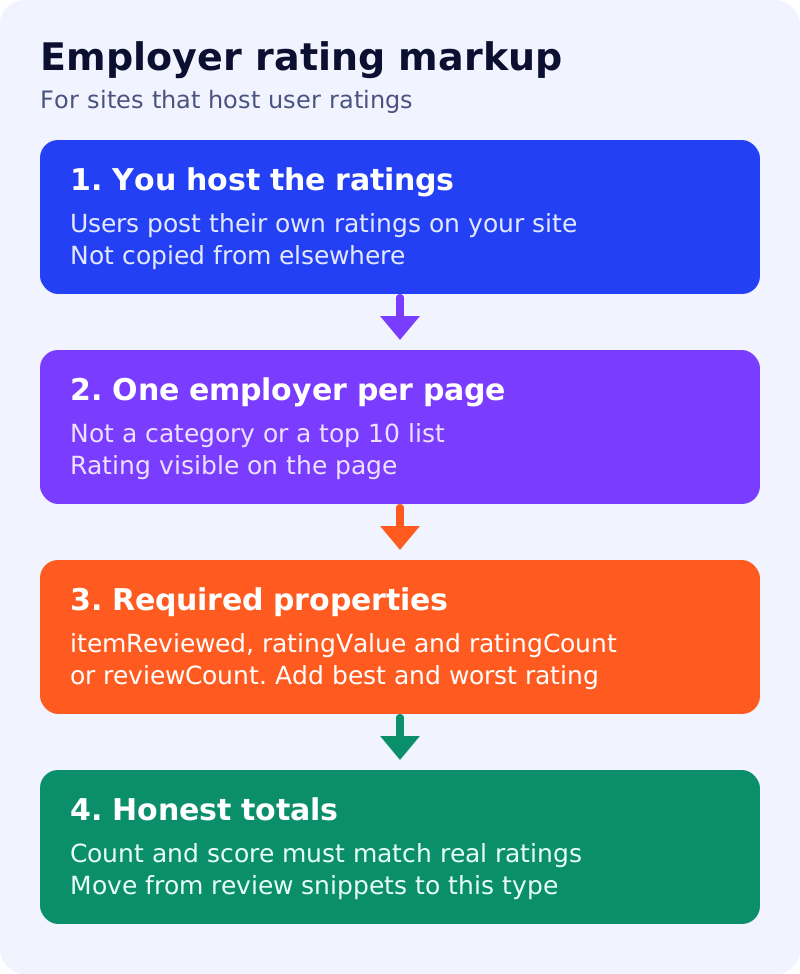
EmployerAggregateRating. It is an evaluation of an employer compiled from many users and can give job seekers ratings to help them choose a job. It also offers prominent brand placement in the enriched job search experience on Google. - During the beta phase, Google recommended review snippet markup for eligibility. If you have that, Google recommends moving to
EmployerAggregateRatingsoon. - Technical guidelines: the ratings must be available to users on the page, and it must be immediately obvious that the page has rating content. Provide ratings about a specific hiring organization, not a category or a list. Google’s examples of what does not count: “top 10 best places to work” and “tech companies”.
- Content guidelines: users must be able to post their own ratings on your site, and your site must host them. The number of ratings must reflect actual user ratings, and the aggregate score must be accurately derived from them.
- Required properties:
itemReviewed(anOrganization),ratingValue, and at least one ofratingCountorreviewCount. - Recommended:
bestRatingandworstRating. Google assumes a 5-point scale (5 best, 1 worst) unless you set these; other scales are scaled to 5 stars. - If a site breaks the guidelines, Google may take manual action.
What to do: step by step
| Step | Owner | Time | How to check | Done when |
|---|---|---|---|---|
| 1. Check eligibility | Product | 30 min | Users post ratings on your site and you host them | Yes, with proof |
| 2. Choose pages | SEO | 30 min | One employer per page, not a list page | Pages named |
| 3. Show the rating | Designer | 1 hour | Rating and count visible on the page | Visible without a click |
| 4. Write the markup | Developer | 2 hours | itemReviewed, ratingValue, count, best and worst rating | Required fields filled |
| 5. Check the maths | Analyst | 1 hour | Count and average match the database | Totals reconcile |
| 6. Test and monitor | SEO | 30 min | Rich Results Test, URL Inspection, Search Console | Passed test and dated review |
Example (made up)
A career site shows “86 out of 100, from 2,300 ratings” for one employer. The markup says ratingValue 86, bestRating 100, worstRating 1 and ratingCount 2300, and the analyst confirms the database gives the same figures. A “best 10 employers” list page gets no rating markup.
Common mistakes
- Marking up a list or category page.
- Copying ratings from another site.
- Leaving out the scale when it is not 5 points.
- Showing totals in markup that the page does not show.
Related: job listing audit, review snippet markup and high-quality reviews checklist. Results are not guaranteed.