

Businesses that serve many areas are tempted to publish one page per city. Google’s spam policies name doorway abuse and keyword stuffing, and both use city examples. This post turns those sections into a test you can apply to every location page.
Best for: SEO leads, local SEO teams and agencies that manage multi-location sites. Learners are welcome: each step names who does it and how to check it.
New to SEO or AEO? A doorway page exists only to catch a search and push people on to another page. Location pages can drift into this when they are copied with only the city name changed.
SEO and AEO angle: Google’s generative AI guide warns that creating separate content for every query variation, mainly to manipulate rankings or AI responses, violates its scaled content abuse policy.
What Google says
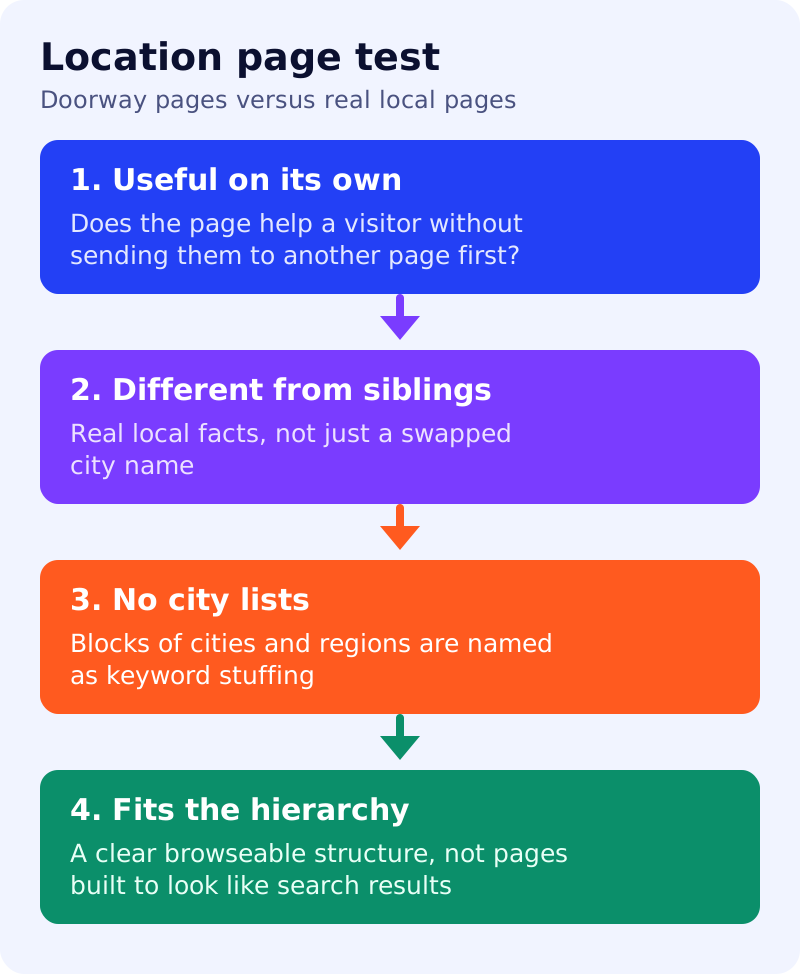
- Doorway abuse is when sites or pages are created to rank for specific, similar search queries. They lead users to intermediate pages that are not as useful as the final destination.
- Google’s examples include: multiple websites with slight variations of the URL and home page to maximise reach for a query; multiple domain names or pages targeted at specific regions or cities that funnel users to one page; generating pages to funnel visitors into the usable part of a site; and substantially similar pages that are closer to search results than to a clearly defined, browseable hierarchy.
- Keyword stuffing is filling a page with keywords or numbers to manipulate rankings. Google’s examples include blocks of text that list the cities and regions a page is trying to rank for, and lists of phone numbers without substantial added value.
- Sites that violate the policies may rank lower or not appear at all, and Google may act through automated systems or a manual action.
- The policy page does not set a limit on the number of location pages. Judge each page against the examples above.
What to do: step by step
| Step | Owner | Time | How to check | Done when |
|---|---|---|---|---|
| 1. List location pages | SEO | 1 hour | URL, city and traffic for every page | Full list in a sheet |
| 2. Ask the five questions | SEO lead | 2 hours | Useful alone? Different from siblings? Leads somewhere useful? No city lists? Fits the site hierarchy? | A pass or fail per question |
| 3. Mark pages | SEO lead | 30 min | Keep, improve, merge or remove | A decision for every page |
| 4. Improve what stays | Local team | 1 day | Real local detail, such as the actual branch, staff and services | Each kept page has its own facts |
| 5. Merge or remove | Developer | 2 hours | Redirect or remove pages that fail | No funnel pages remain |
| 6. Review quarterly | SEO | 30 min | New pages go through the same test | Review dated |
Example (made up)
A plumber has 80 city pages that differ only by the city name and a list of 40 nearby towns. The review keeps 6 pages where the company has a real branch and unique details, redirects the rest to the service area page, and removes the town lists.
Common mistakes
- Cloning one page and swapping the city name.
- Adding a footer list of every area served.
- Running extra domains that all send visitors to one page.
- Treating “more pages” as the plan.
Related: spam policies self-audit and local business pages in AI Mode. Results are not guaranteed.