

A user agent string can say anything. If your logs show “Googlebot” hitting a page thousands of times, you need a way to know whether Google really sent it. Google’s verification page gives two methods. This post turns them into a routine for log analysis and for security reviews.
Best for: SEO analysts, developers and security teams who read server logs. Learners are welcome: each step names who does it and how to check it.
New to SEO or AEO? Googlebot is the program Google uses to visit pages so they can appear in Search. Anyone can pretend to be it in a server log, so Google publishes a way to check.
SEO and AEO angle: Google’s generative AI guide says its AI features use publicly accessible, crawlable content, so knowing which visits are really Google’s helps you keep crawling healthy without blocking the real thing.
What Google says
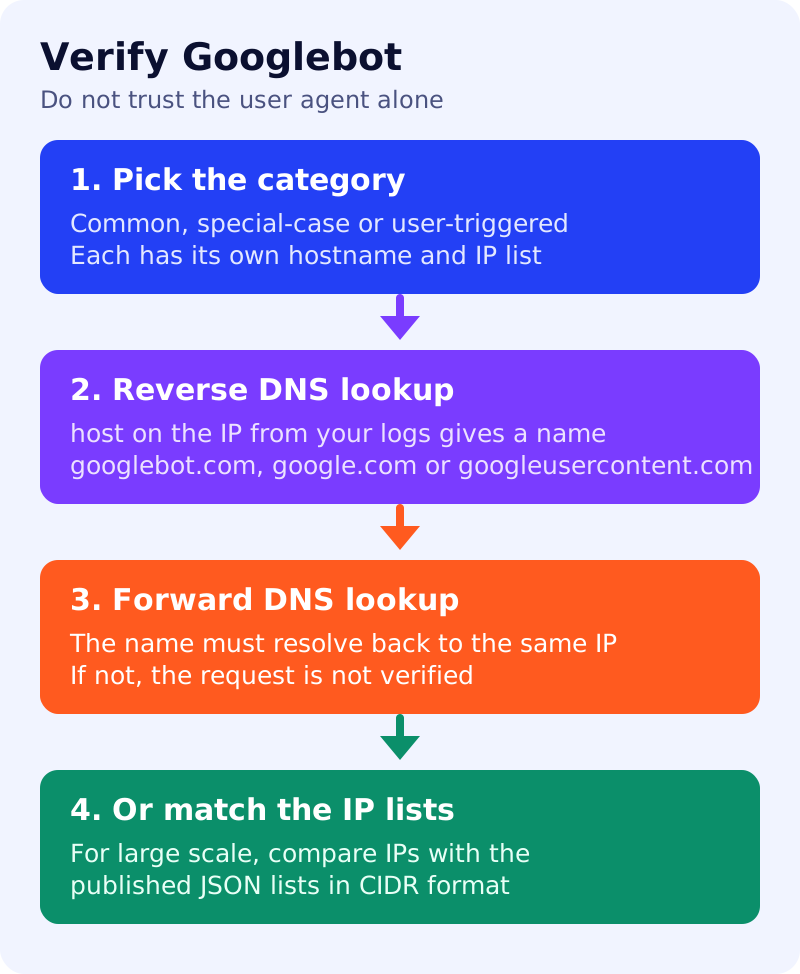
- You can verify whether a request really is from Google. This is useful if you are concerned that spammers or other troublemakers claim to be Google.
- Google’s crawlers and fetchers fall into three categories: common crawlers (such as Googlebot, which always respect robots.txt for automatic crawls), special-case crawlers (such as AdsBot, which may or may not respect robots.txt), and user-triggered fetchers (which ignore robots.txt because a user requested the fetch).
- Each category has a reverse DNS mask and a published JSON file of IP ranges. For common crawlers the mask is
crawl-***-***-***-***.googlebot.comorgeo-crawl-***-***-***-***.geo.googlebot.com. Special-case crawlers resolve torate-limited-proxy-***-***-***-***.google.com. - Manual method: run a reverse DNS lookup on the IP from your logs with the
hostcommand, check that the domain isgooglebot.com,google.comorgoogleusercontent.com, then run a forward lookup on that name and check that it returns the original IP. Google says this is sufficient for most use cases. - Automatic method: for large scale lookups, match the IP against Google’s published lists, which are in CIDR format.
What to do: step by step
| Step | Owner | Time | How to check | Done when |
|---|---|---|---|---|
| 1. Pull suspect IPs | Analyst | 20 min | IPs from logs claiming a Google user agent | A short list with counts |
| 2. Reverse lookup | Analyst | 10 min | host <IP> returns a hostname | Hostname recorded |
| 3. Check the domain | Analyst | 5 min | googlebot.com, google.com or googleusercontent.com | Domain accepted or rejected |
| 4. Forward lookup | Analyst | 10 min | host <hostname> returns the same IP | IP matches, or it is not Google |
| 5. Automate if large | Developer | 3 hours | Compare IPs with the JSON lists, refresh them regularly | A scheduled job with an owner |
| 6. Decide what to do | Security | 30 min | Block or rate-limit only the unverified IPs | Verified Google requests are untouched |
Example (made up)
Logs show 5,000 requests a day from one IP with a Googlebot user agent. The reverse lookup returns a hostname that does not end in a Google domain, so the IP fails verification and is rate-limited. A second IP resolves to a googlebot.com name that forward-resolves to the same address, so it stays allowed.
Common mistakes
- Trusting the user agent string alone.
- Skipping the forward lookup after the reverse lookup.
- Blocking an IP range from an old list.
- Mixing up the three categories and expecting all to obey robots.txt.
Related: Google’s crawlers and fetchers, HTTP status codes and crawling and how Google Search works. Results are not guaranteed.