
A shopper asking an AI tool for “the best running shoes for flat feet” is looking for a category’s worth of options. Your category page can help, but only if crawlers can reach it, read it, and trust it. Neither Google nor OpenAI offers a switch that guarantees inclusion, so the work is foundational. Here is what their documentation supports.
Step 1: make every product reachable
Google’s ecommerce guidance says to link from menus to category pages, from category pages to subcategory pages, and from those to all product pages. It warns that if category pages do not link directly to all products, Googlebot might not find them by crawling alone. Use standard <a href> links, not JavaScript events on other elements. If you cannot link to everything, Google says a sitemap or a Merchant Center feed can list pages a crawler would not otherwise find.
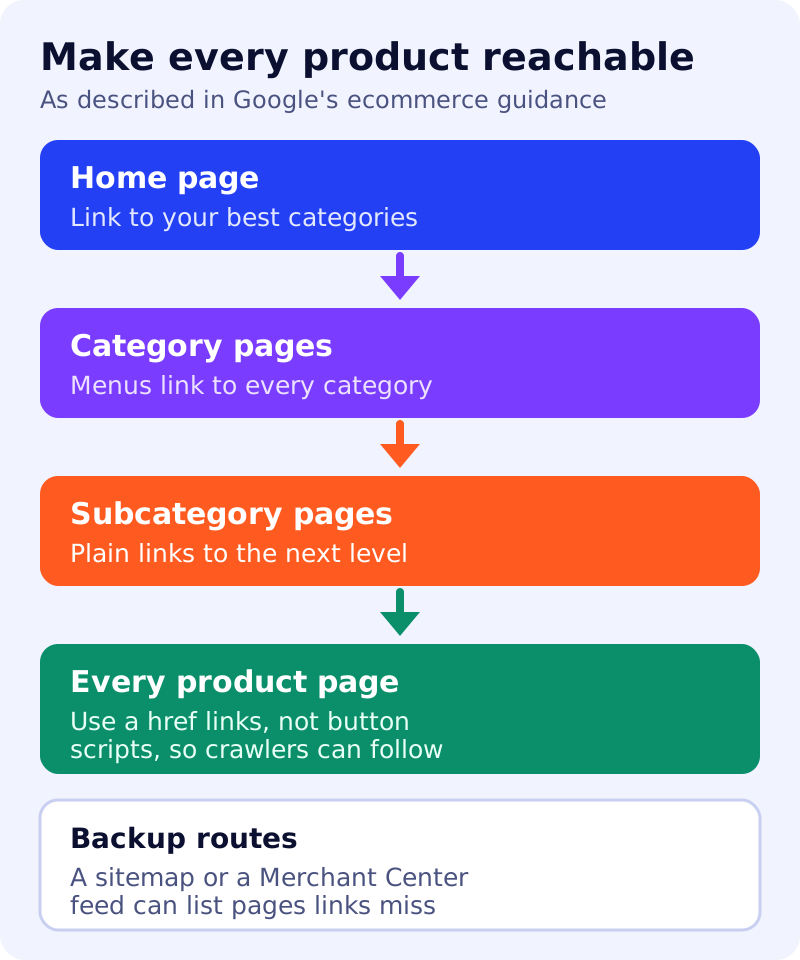
Google also says it judges a page’s importance partly by how many links point to it within your site. If a category matters, link to it from your home page and from relevant articles.
Step 2: pick a layout crawlers can follow
Long categories are split across pages. Google lists three patterns: pagination, “load more” buttons, and infinite scroll. It notes that its crawlers generally follow href links in <a> elements and do not click buttons or trigger scripts that need user actions. So “load more” and infinite scroll need extra care: make sure the content is also reachable by links.
Step 3: add content that helps a buyer decide
Google’s helpful content guidance asks whether a page offers original information, a substantial description of the topic, and value beyond other pages. For a category page, that can mean a short buying guide, sizing or compatibility notes from people who handle the products, and clear differences between product types. Avoid rewriting manufacturer text.
Step 4: keep product data in sync
For Google’s AI features, the guide suggests checking that Merchant Center and Business Profile information is up to date, and that structured data matches the visible text. Our guide to AEO for e-commerce covers product markup and feeds.
Step 5: let ChatGPT’s search crawler in
OpenAI’s crawler documentation says OAI-SearchBot is used to surface websites in ChatGPT’s search features, and that sites opted out of it are not shown in ChatGPT search answers, though they can still appear as navigational links. OpenAI recommends allowing it in robots.txt. Its settings are separate from GPTBot, which relates to training. See our list of OpenAI bots. We could not open OpenAI’s page directly, so check it for current details.
What to do
- Crawl your own category pages and confirm every product is reachable by a link.
- Check your layout: if you use infinite scroll, add link-based paths.
- Write one genuinely useful intro per important category, from real product knowledge.
- Match feed, markup and page for price, stock and shipping.
- Review robots.txt for OAI-SearchBot and Googlebot.
- Track results in Search Console and your analytics, and expect no guarantees.
Sources: Google Search Central and OpenAI documentation, as linked above.