
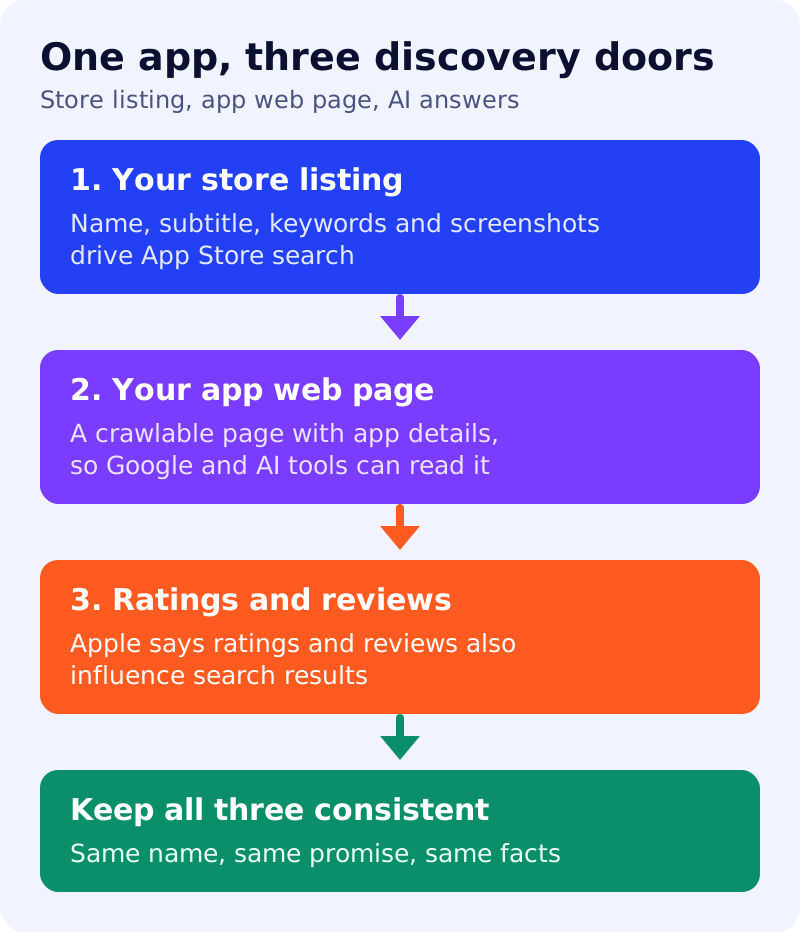
People find apps in three places: store search, web search, and AI answers. App Store optimisation (ASO) covers the first. Ordinary SEO covers the second. For the third, Google says there is no special optimisation beyond the fundamentals. This guide combines what Apple and Google document. We did not review Google Play’s own documentation, so check it for Android details.
Door 1: your store listing
Apple says App Store search results rest on text relevance, meaning matches in your app’s title, subtitle, keywords and primary category, plus user behaviour such as downloads, ratings and reviews. Its guidance includes:
- Name and subtitle: each up to 30 characters. Apple says the subtitle is the place to explain value in more detail, and to avoid generic claims such as “world’s best app”.
- Keywords: up to 100 characters, separated by commas, with no repeats of words in your name, subtitle or category. Apple says promotional text does not affect search ranking.
- Screenshots and previews: up to 10 screenshots, and up to three app previews of 30 seconds each. Apple says the first one to three images can appear in search results.
- Custom product pages: assign keywords so a matching page can appear instead of your default page.
- App tags: Apple says search results can include tags generated by large language models from the metadata you provide, so accurate metadata matters.
Door 2: a crawlable app page
Store pages do not replace your own site. Google’s software app markup lets you describe an app on a web page. Required properties are name, offers.price (use 0 for a free app) and either aggregateRating or review. Google recommends applicationCategory and operatingSystem. Only mark up what is visible on the page, and keep it matching your store listing.
Door 3: AI answers
Google’s AI features guide says a page must be indexed and eligible to appear in Search with a snippet, and that no special schema is needed. For ChatGPT, OpenAI’s crawler documentation says to allow OAI-SearchBot in robots.txt. See our guide to getting a blog found in ChatGPT and AI Mode.
What to do
- Write your subtitle and keywords around real user phrases, with no filler or repeated words.
- Use accurate metadata, since store tags are generated from it.
- Publish an app page on your site with the same name, promise and facts as your listing.
- Add SoftwareApplication markup that matches the visible page.
- Allow OAI-SearchBot and Googlebot in robots.txt.
- Ask for ratings honestly, and respond to reviews.
Sources: Apple Developer and Google Search Central documentation, as linked above.